
Backtesting · Platform Comparison
MetaTrader vs Algotradium
Backtesting — testing a trading strategy on historical data — is one of the fundamental and undeniable pillars of developing a successful trading system. This process allows traders to test their ideas and strategies in a risk-free environment, identify strengths and weaknesses, and ultimately enter real markets with greater confidence. In this article, we will thoroughly examine the backtesting process in the powerful and well-known MetaTrader platform, then compare it with the capabilities and modern approach of the Algotradium platform. Our goal is for you to choose the best tool for your trading needs with full awareness of the advantages and limitations of both platforms.
MetaTrader, especially version 5 (MT5), is one of the most popular trading platforms in the world, featuring a powerful built-in tool called the Strategy Tester.
The Strategy Tester in MetaTrader is primarily designed for testing and optimizing Expert Advisors (EAs) — trading robots. This tool simulates your strategy’s past performance using historical price data, allowing you to evaluate its effectiveness. You can then use these robots to execute real trades with your broker.
Getting Started:
First, install MetaTrader software on your computer. You typically receive this software from your broker.
To access historical data and platform features, you need a trading account (even a demo account) with a reputable broker. MetaTrader downloads historical price data directly from your broker’s servers.
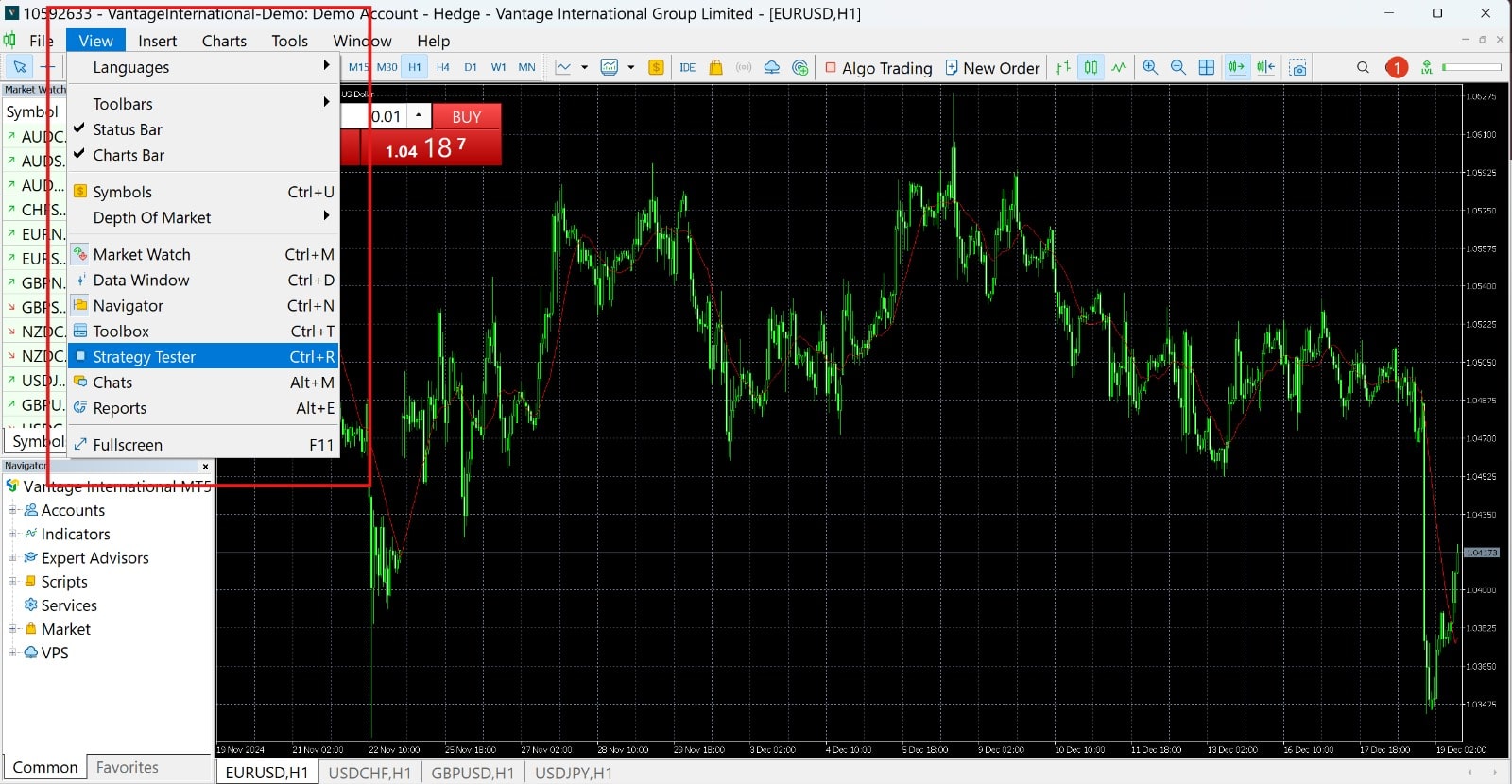
To open this tool, go to View > Strategy Tester from the top menu or use Ctrl+R.
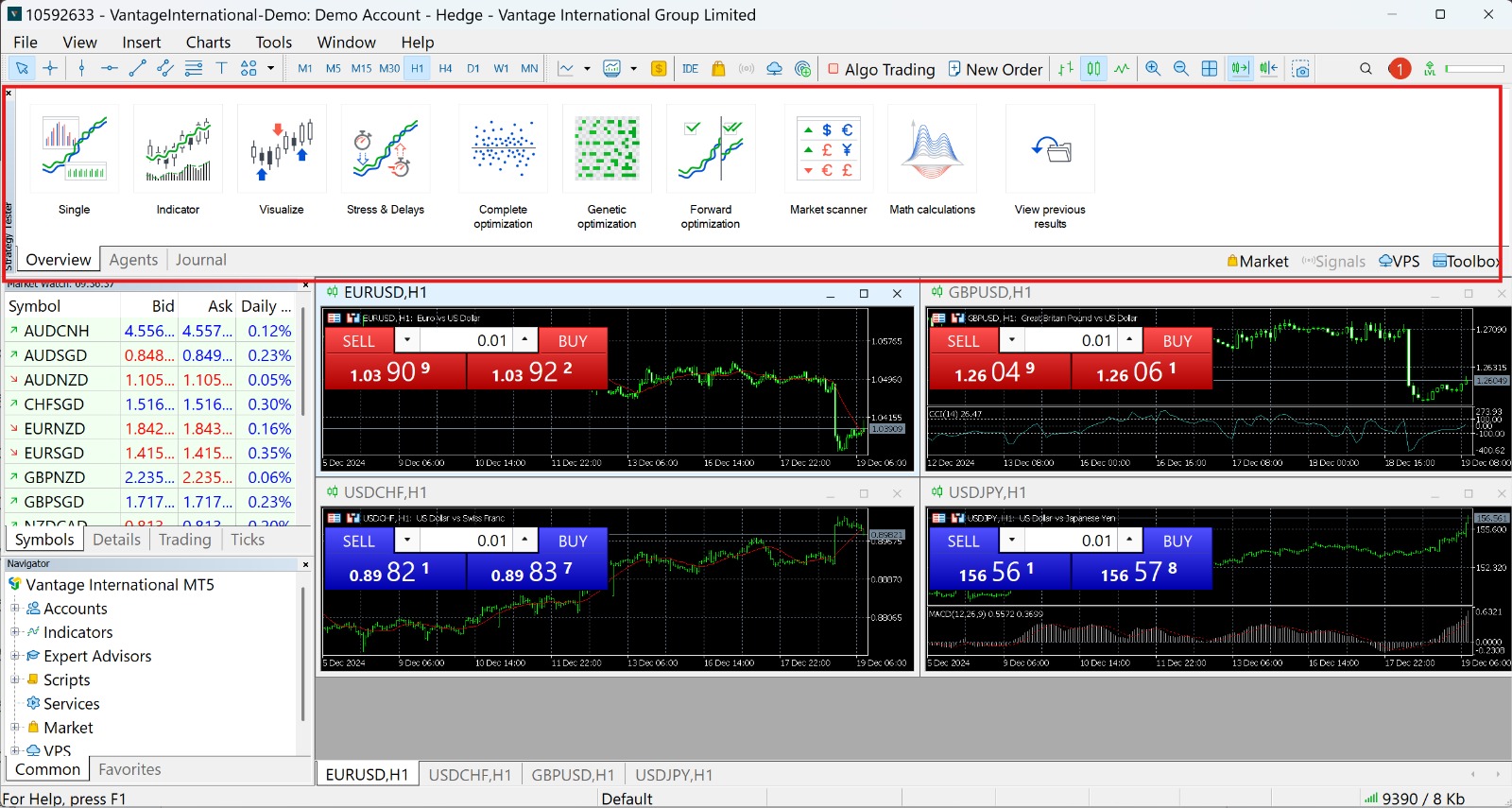
The Strategy Tester window appears at the bottom. You can drag and drop it to your desired location.
Here you define your main test parameters:
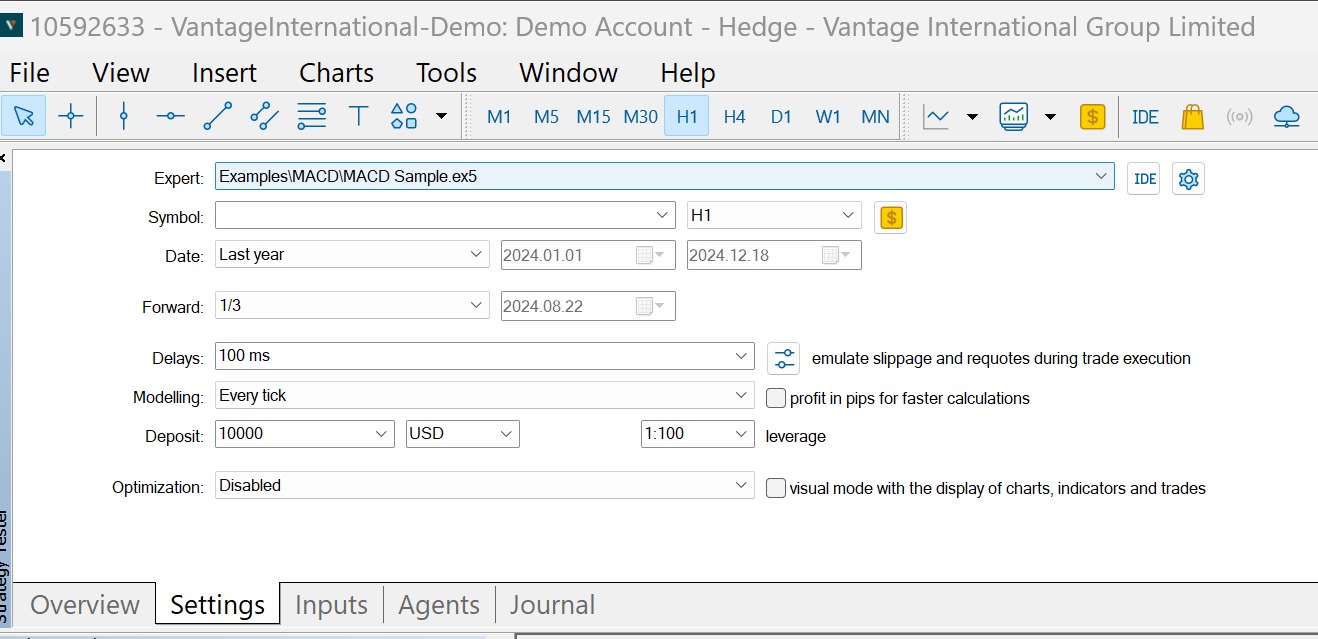
If you want to watch the test execution live on the chart, enable Visual Mode. This lets you see entry/exit points, stop loss/take profit placement, and overall strategy behavior over time. Finally, click Start to begin your backtest.
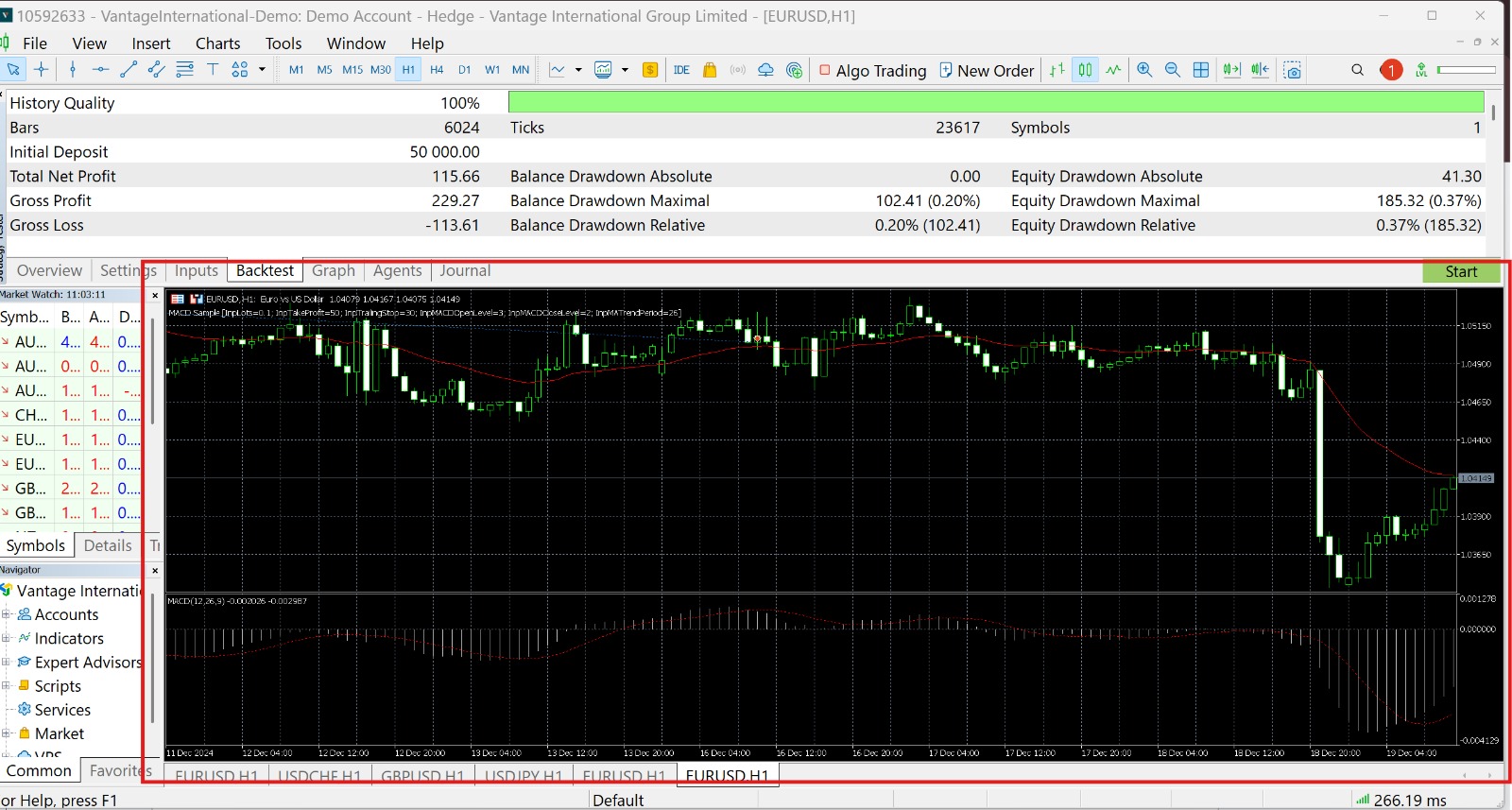
After the test completes, results are shown in detail in the Results (or Backtest) tab. Key performance metrics include:
After the test completes, results are shown in detail in the Results (or Backtest) tab. Key performance metrics include:
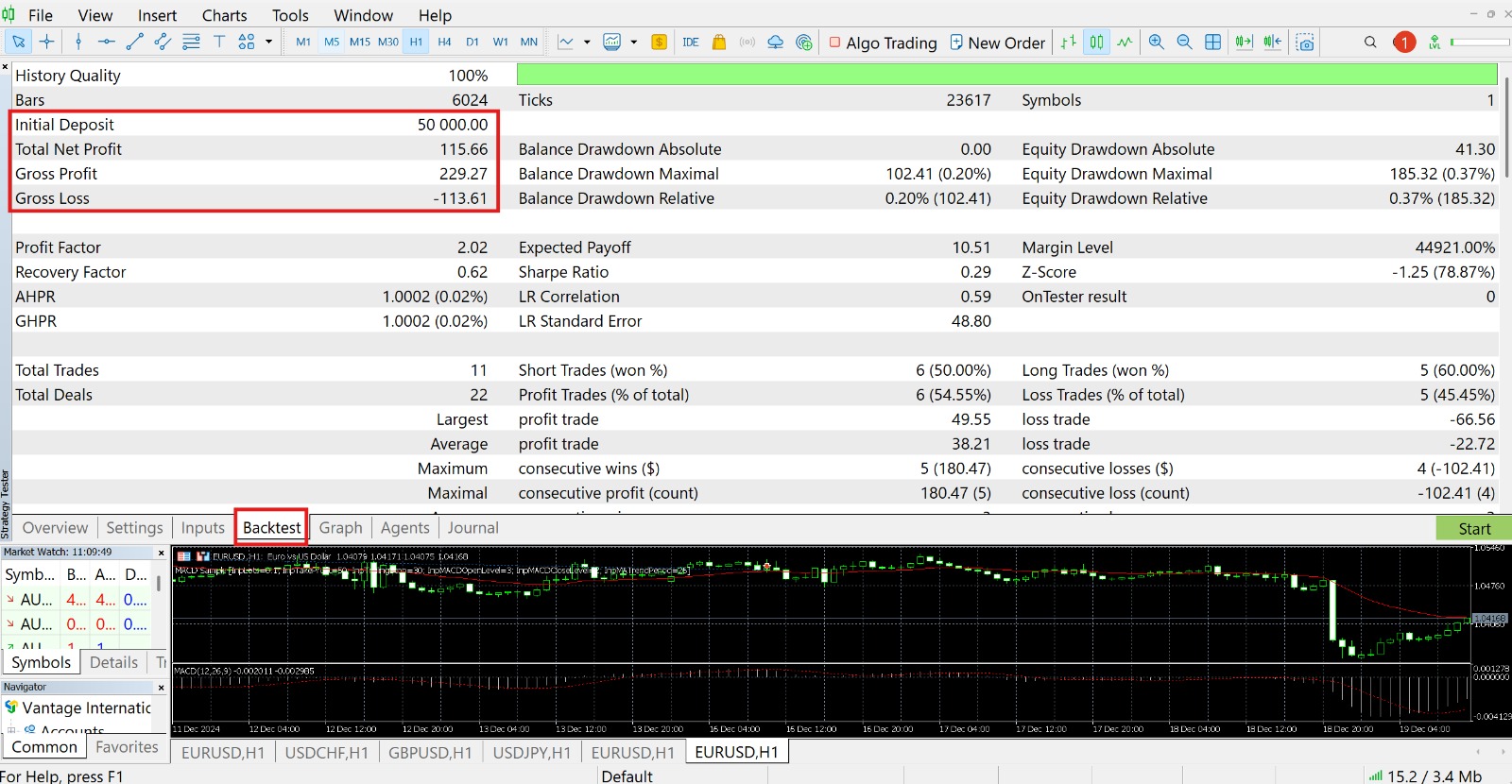
MetaTrader also provides useful charts:
You must install software and have an account (even demo) with a specific broker. If your broker’s data lacks quality or history, test results become unreliable. Additionally, reputable brokers impose many restrictions on Iranian users — even if you create a demo account, converting to a real account requires identity verification.
For custom strategies, you must learn MetaTrader’s proprietary language, MQL4/MQL5. While powerful, these lack the flexibility of general-purpose languages like Python.
The Strategy Tester interface can be complex and difficult for beginner traders without technical or programming knowledge.
Downloaded historical data from brokers may be incomplete or have gaps, negatively affecting result accuracy.
Although MT5 supports multiple markets, accessing historical data for markets like real-time data for all cryptocurrencies is not straightforward. At best, you need a broker account that supports both MetaTrader and your desired assets — which is not true for most reputable crypto exchanges.
The Algotradium platform was designed with these challenges in mind, aiming to simplify and make accessible the backtesting and strategy-building process. It offers a web-based solution that removes many obstacles found in traditional platforms.
Algotradium is a web-based platform that frees users from software installation, broker dependency, and learning proprietary programming languages. The goal is to create an integrated, powerful, yet user-friendly environment for traders at all levels.
Simply open your web browser and go to the Algotradium platform. You do not need a broker account — just a simple registration on the platform itself.
Algotradium offers two powerful ways to define strategies:
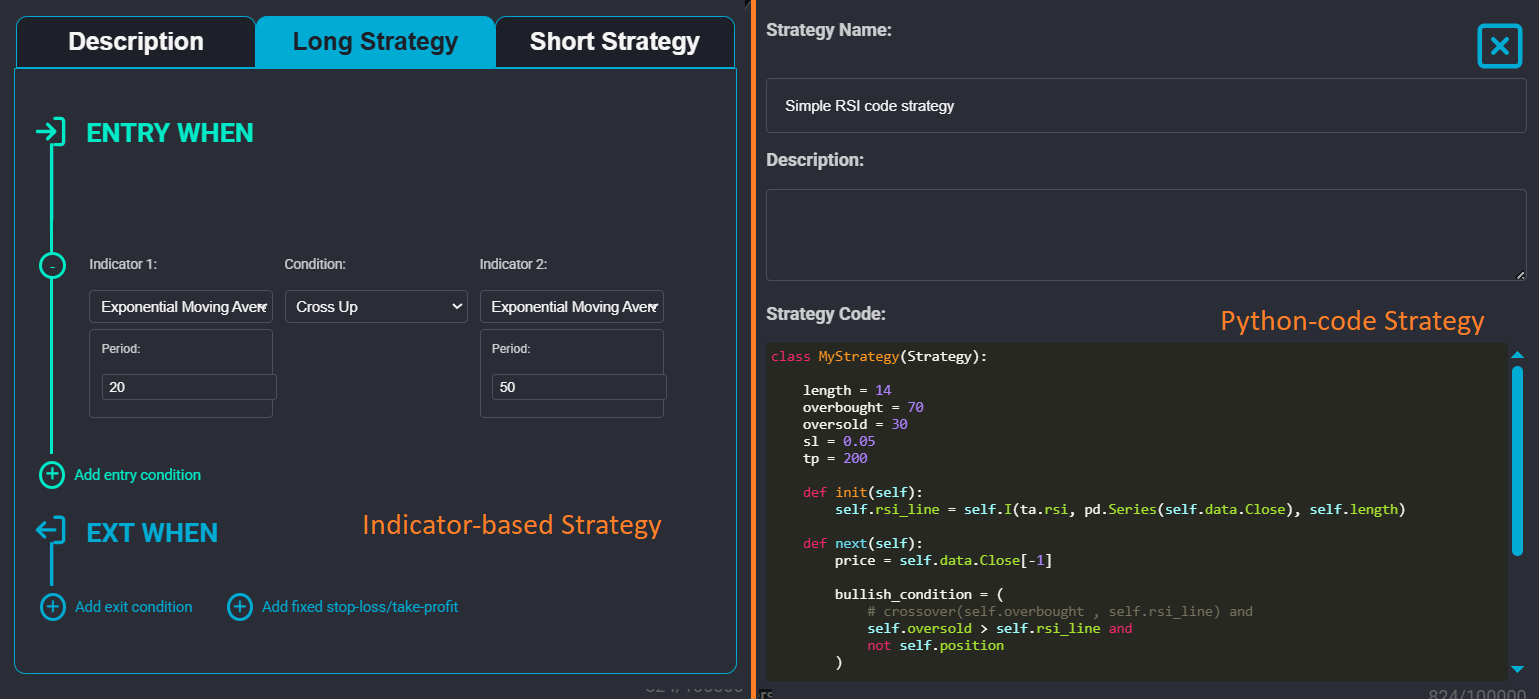
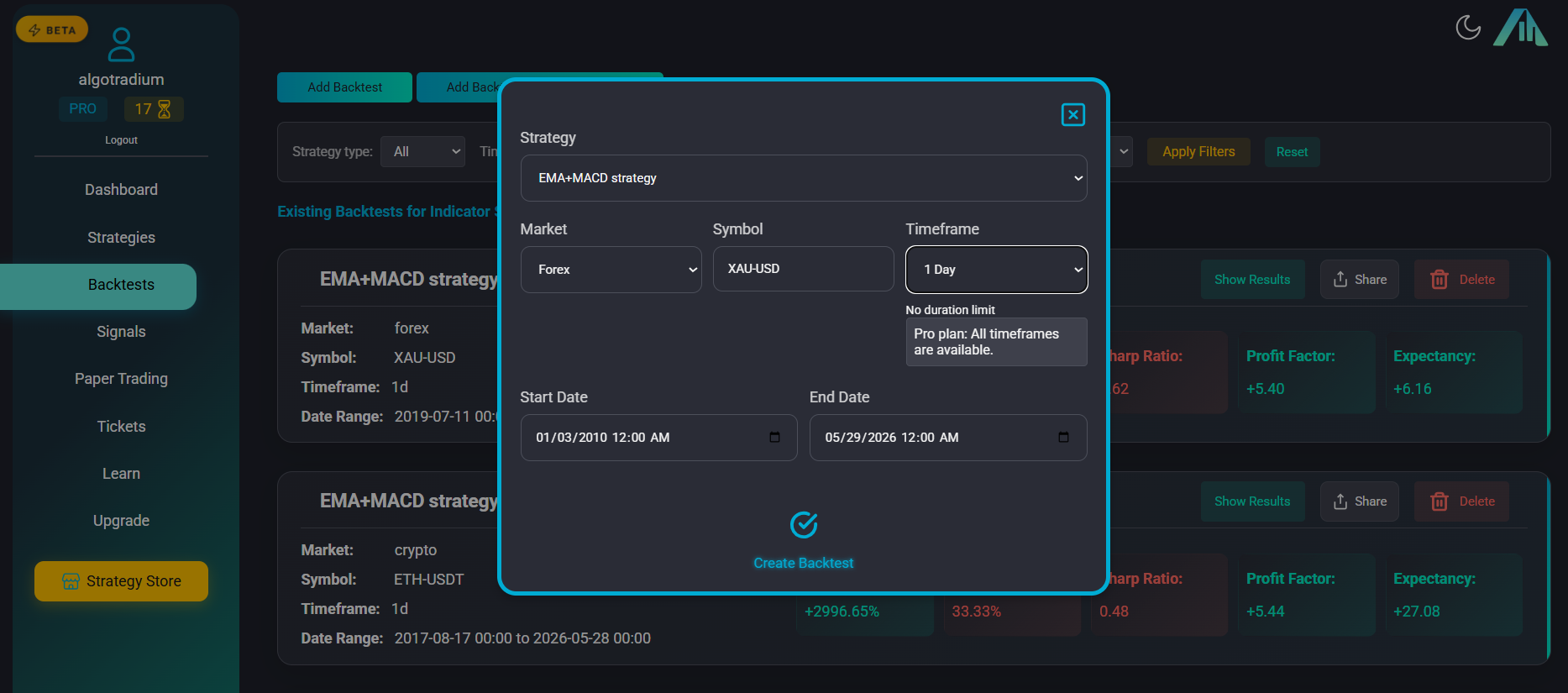
After saving your strategy, go to Backtests section and click “Add Backtest”.
Choose your previously defined strategy (indicator or Python).
Choose market (Forex, Crypto, Gold/Silver) and specific symbol. Crypto data comes directly from Binance — reliable quality you can trust.
Choose market (Forex, Crypto, Gold/Silver) and specific symbol. Crypto data comes directly from Binance — reliable quality you can trust.
Specify exact start and end dates using the calendar.
Click “Create Backtest” — a card appears with “Pending” status. Click “Run Backtest” and within less than a minute, the status changes to “Completed”.
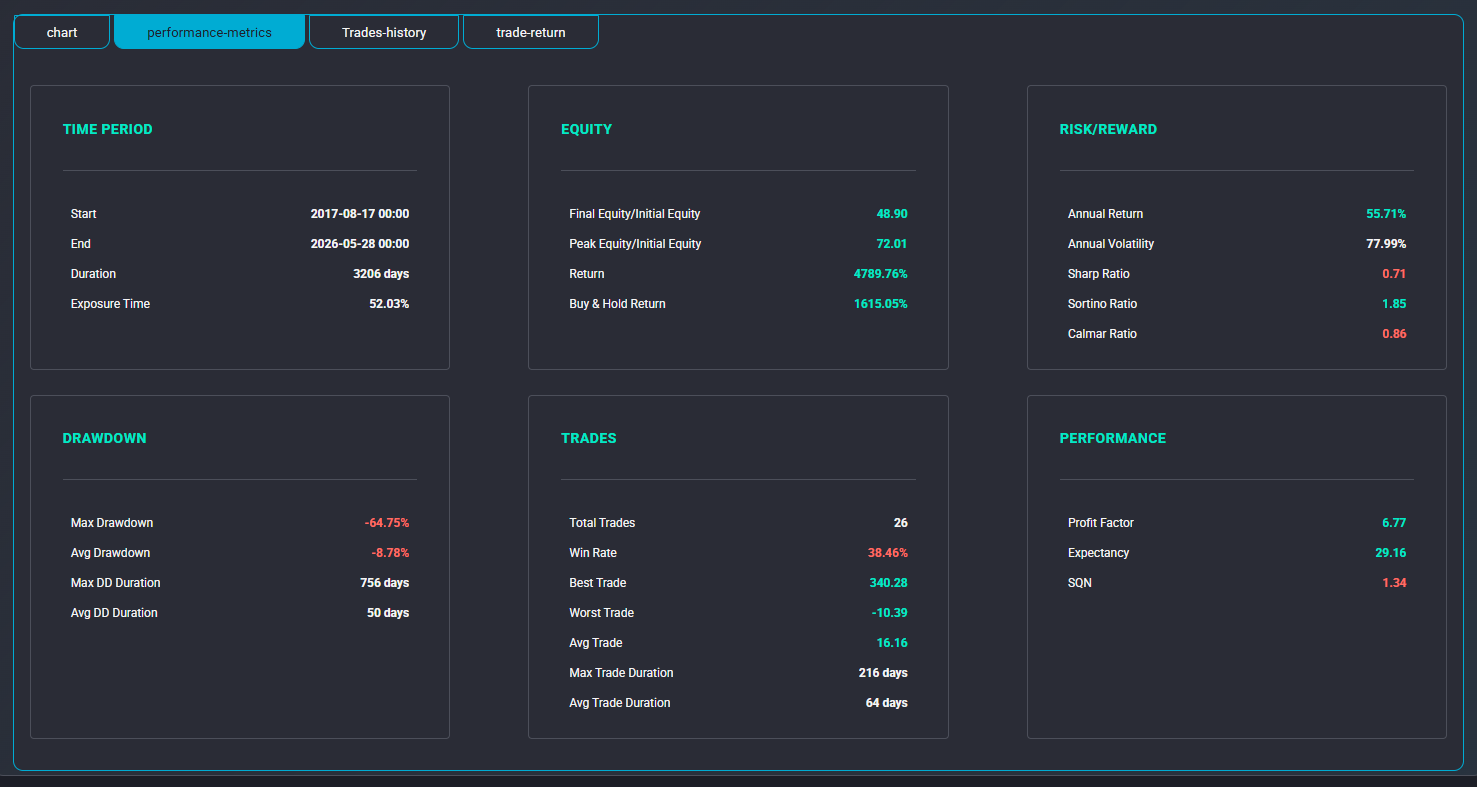
Algotradium calculates and displays a wide range of performance metrics:
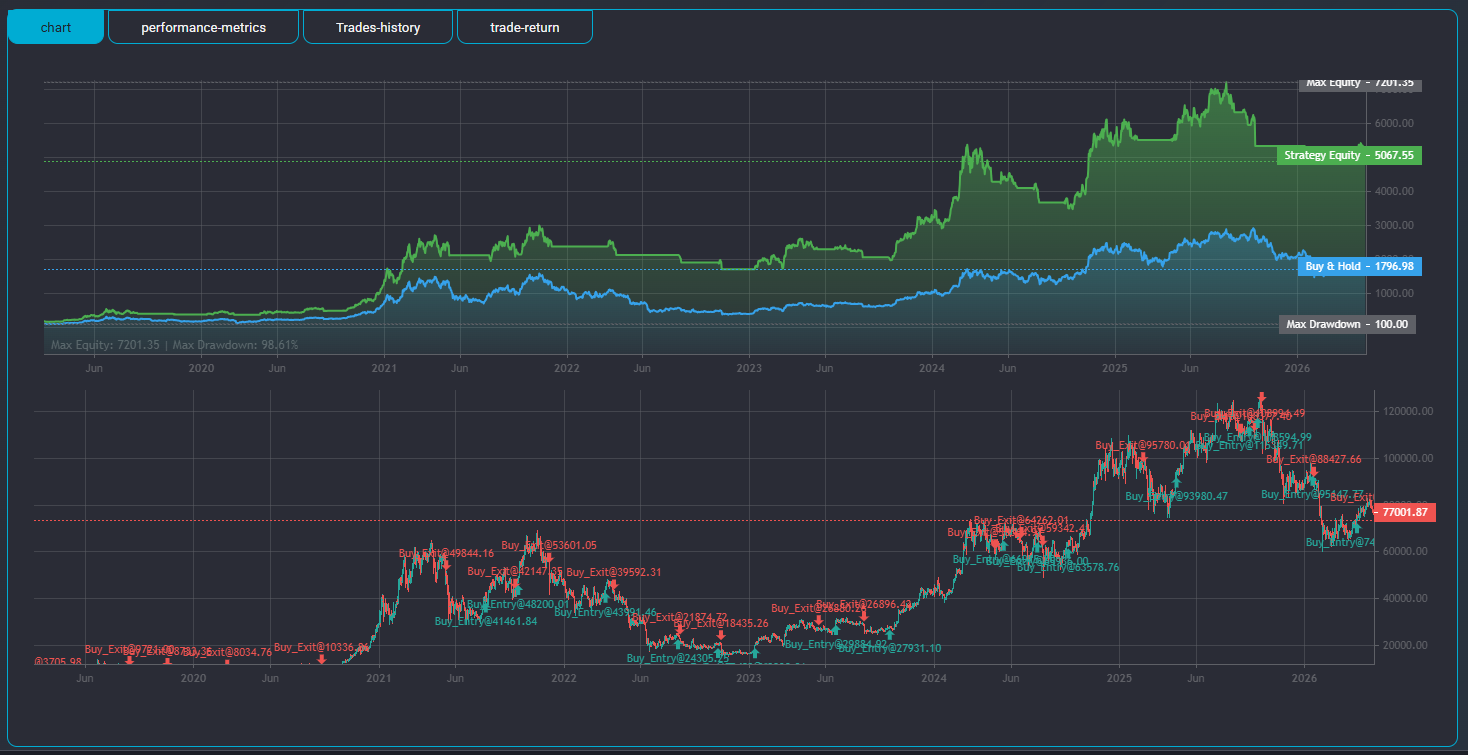
Main price chart with clear markers showing entry (green arrow) and exit (red arrow) points for each trade.
Two curves on one chart: Equity Curve (account growth) and Buy & Hold Curve (if you simply bought and held). Easy comparison on synchronized time axes.
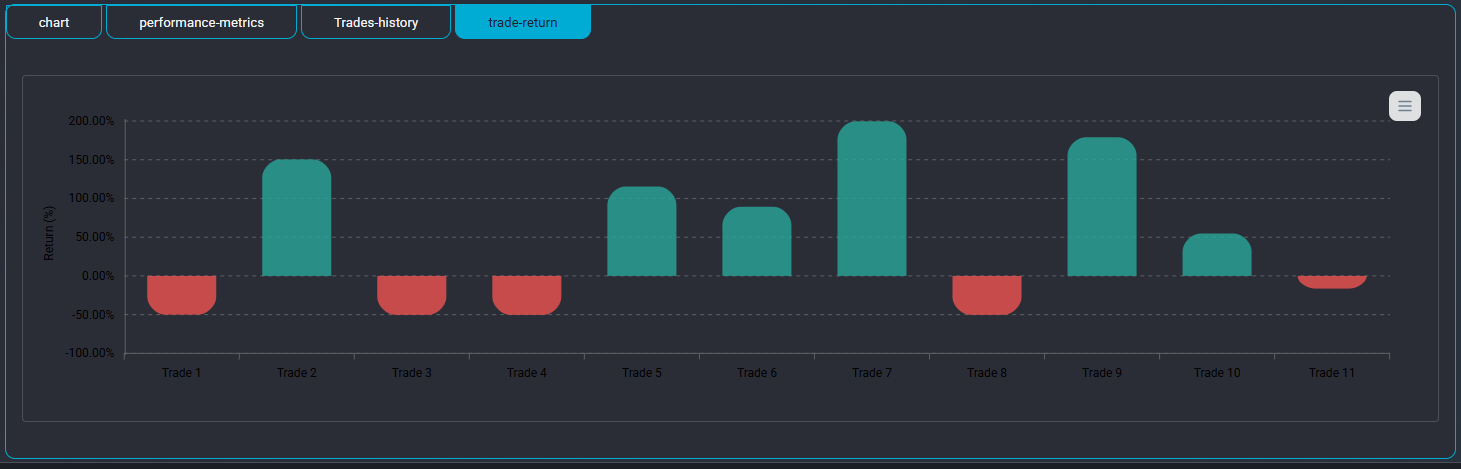
Bar chart showing profit/loss of each trade in chronological order — easily identify winning and losing sequences.
A unique feature of Algotradium is the ability to save every backtest result. You can store results from different tests and revisit or compare them anytime — crucial for tracking strategy development over time.
For deeper analysis, download complete trade reports as CSV files to open in Excel or Google Sheets for advanced statistical analysis. You can also combine backtest results from consecutive time periods (especially for smaller timeframes) into one CSV for comprehensive strategy analysis.
The table below provides a concise comparison between the two platforms:
| Feature | MetaTrader (MT5) | Algotradium |
|---|---|---|
| Platform Type | Desktop software (requires installation) | Web-based (no installation) |
| Broker Dependency | Yes (even for demo accounts) | No |
| Data Access | Via broker (may be incomplete) | Integrated, from reliable sources (e.g., Binance) |
| Strategy Definition | MQL5 coding | Visual (no-code) + Python coding |
| Strategy Flexibility | High (limited by MQL5 knowledge) | Very High (Python + custom indicators) |
| Supported Markets | Forex, stocks, futures (broker-dependent) | Forex, Crypto, Gold, Silver |
| Performance Metrics | Standard, basic | Comprehensive & Advanced (Sharpe, Sortino, Calmar, etc.) |
| Analytical Charts | Equity Curve, Drawdown | More Advanced (equity vs buy & hold, PnL bar chart) |
| Save Results | Yes | Yes (full save and restore) |
| User-Friendliness | Medium (complex for beginners) | Excellent (suitable for all levels) |
Both MetaTrader and Algotradium are valuable tools for the trading community, but each serves a different audience.
MetaTrader is a traditional, powerful choice suitable for professional users dependent on the MQL5 environment and working with a specific broker.
However, the Algotradium platform, with its modern, web-based, user-focused approach, responds to many limitations of traditional platforms. It not only simplifies the backtesting process by removing technical barriers but also provides more advanced analytical tools for deeper, more comprehensive understanding of strategy performance. Unified access to diverse markets and Python coding make Algotradium an ideal, forward-looking choice
We hope this comprehensive comparison provides a clear roadmap for choosing the right tool on your challenging yet rewarding trading journey.