

So you're diving into algorithmic trading and you've heard you need to backtest your strategies. Makes sense—why risk real money on an idea that might flop? But then you hit the wall: which Python backtesting library should you use? There are dozens out there, each with its own quirks, strengths, and learning curves. It's like walking into a tool shed full of hammers, saws, and laser cutters—you need the right one for the job.
In this guide, we're going to compare the top Python backtesting libraries for 2026. We'll look at backtesting.py, Backtrader, VectorBT, Zipline, and a few others. I'll break down what each does best, where they fall short, and who should use them. Whether you're a complete beginner or a seasoned quant, by the end you'll know exactly which library fits your workflow.
Let's be real: there's no single "best" library. It depends on your strategy complexity, data size, and whether you want to eventually go live. But we'll help you narrow it down. Ready? Let's get into it.
Before we jump into the nitty-gritty, let's quickly touch on why you even need a dedicated backtesting library. Sure, you could write your own loop over historical prices, calculate signals, and track P&L. But that's like building a car engine from scratch when you just want to drive to the store. A good backtesting library handles the boring stuff—data management, order execution, slippage, commissions—so you can focus on your strategy. Plus, it gives you reliable metrics like the Sharpe ratio, max drawdown, and win rate without reinventing the wheel.
If you're brand new to backtesting, I'd recommend starting with our Python Backtesting: The Complete Guide (2026) for a broader overview. And if you want a hands-on tutorial that walks you through your first backtest step by step, check out the Simple Python Backtesting Tutorial for Beginners (2026).
Now, let's set the stage with a quick peek at what each library brings to the table. Here's a snapshot:
| Library | Best For | Learning Curve | Speed |
|---|---|---|---|
| backtesting.py | Beginners, simple strategies | Low | Moderate |
| Backtrader | Complex strategies, live trading | Medium | Moderate |
| VectorBT | High-frequency, large datasets | High | Very Fast |
| Zipline | Event-driven, Quantopian legacy | High | Slow |
Don't worry if this table feels a bit abstract right now—we'll dive deep into each library in the following sections. You'll see actual code, real trade-offs, and honest opinions. By the time you finish reading, you'll have a clear winner for your specific situation.
One more thing before we move on: backtesting isn't just about picking a library. It's about building a process that helps you avoid overfitting, understand your strategy's weaknesses, and gain confidence before you put real money on the line. The library is just a tool—a damn important one, but still a tool. So let's find the right one for your toolbox.
So you've got a trading idea—maybe a simple moving average crossover or something fancier with RSI and Bollinger Bands. You could just write a loop over historical prices, calculate returns, and call it a day. But should you? Probably not. Here's why a dedicated Python backtesting library is worth your time.
Writing a backtester from scratch sounds easy until you realize how many things you're missing. Slippage, transaction costs, position sizing, different order types—these aren't just nice-to-haves; they're essential for realistic results. A good library handles all that out of the box. It also spits out performance metrics like Sharpe ratio, max drawdown, and win rate without you writing a single formula. And let's be honest, who wants to code a Sharpe ratio from scratch when you could be testing strategies?
Take a moving average crossover strategy. You want to know more than just the final profit. How many trades did it make? How long were you in the market? Did it survive the 2008 crash or the 2020 COVID dip? A library gives you that context instantly. Plus, most libraries let you plot your trades on a chart—seeing where you bought and sold is huge for spotting flaws in your logic.
Your hand-rolled loop might work fine on a year of daily data, but what about tick data for a multi-year backtest? Or parameter optimization across hundreds of combinations? Pure Python loops are painfully slow. Libraries like VectorBT use NumPy and Numba under the hood to run thousands of simulations in seconds. That's a game-changer when you're trying to find the best parameters for your strategy. Speed isn't just a luxury; it's a necessity for serious backtesting.
Let's see what a real backtest looks like. Here's a quick example using the backtesting.py library—a favorite among beginners:
from backtesting import Backtest, Strategy
from backtesting.lib import crossover
import pandas as pd

# Load your data (OHLC)
data = pd.read_csv('AAPL.csv', index_col=0, parse_dates=True)

class SmaCross(Strategy):
    n1 = 10
    n2 = 20

    def init(self):
        self.sma1 = self.I(lambda x: pd.Series(x).rolling(self.n1).mean(), self.data.Close)
        self.sma2 = self.I(lambda x: pd.Series(x).rolling(self.n2).mean(), self.data.Close)

    def next(self):
        if crossover(self.sma1, self.sma2):
            self.buy()
        elif crossover(self.sma2, self.sma1):
            self.sell()

bt = Backtest(data, SmaCross, cash=10000, commission=.002)
stats = bt.run()
bt.plot()
print(stats)
That's it. In about 15 lines, you've got a full backtest with trades, equity curve, and performance stats. Try doing that with a raw loop—you'd still be debugging slippage calculations.
| Feature | Manual Loop | Backtesting Library |
|---|---|---|
| Slippage & commissions | You code it (and probably get it wrong) | Built-in, configurable |
| Performance metrics | You calculate Sharpe, drawdown, etc. | One line: stats = bt.run() |
| Order types (limit, stop) | Complex to implement | Simple methods like self.buy(), self.sell() |
| Visualization | You plot manually with matplotlib | Built-in chart with trade markers |
| Speed (large data) | Slow, especially with loops | Optimized (NumPy, Numba) |
I once backtested a mean-reversion strategy using a simple loop. It looked great—40% annual returns! But when I ran it through a proper library, the results were completely different. Why? My loop ignored slippage and assumed I could trade at the exact close price every time. In reality, with market impact and spreads, the strategy was barely profitable. A library would have caught that from the start. Don't make the same mistake.
If you're new to backtesting, check out our Python Backtesting: The Complete Guide (2026) for a full walkthrough. For a hands-on tutorial using backtesting.py, see our Simple Python Backtesting Tutorial for Beginners (2026). And if you want an all-in-one platform that combines backtesting with live trading and optimization, Algotradium has you covered—but more on that later.
So, should you write your own backtester? Only if you enjoy debugging slippage at 2 AM. For the rest of us, a Python backtesting library is the way to go. It saves time, reduces errors, and gives you the insights you need to build better strategies. Now let's compare the top contenders.
If you're new to backtesting, backtesting.py is probably your best starting point. It's lightweight, easy to install (just pip install backtesting), and has a clean API that feels intuitive. You define your strategy as a class with init() and next() methods, and the library handles the rest. No boilerplate, no fuss.
What makes it great for beginners? First, the documentation is solid and includes plenty of examples. Second, it comes with built-in plotting using Bokeh, so you can see your trades on interactive charts. Third, it's opinionated—it forces you to structure your code in a way that's easy to understand. You don't have to worry about order management, slippage, or commissions; backtesting.py does that for you.
Let me give you a concrete example. Say you want to test a simple SMA crossover. With backtesting.py, you write a class that inherits from Strategy, calculate two moving averages in init(), and in next() you check for crossovers and call self.buy() or self.sell(). That's it. The library automatically handles order execution, slippage, and commission.
from backtesting import Backtest, Strategy
from backtesting.lib import crossover
import pandas as pd

class SmaCross(Strategy):
    def init(self):
        price = self.data.Close
        self.sma1 = self.I(lambda x: pd.Series(x).rolling(10).mean(), price)
        self.sma2 = self.I(lambda x: pd.Series(x).rolling(20).mean(), price)

    def next(self):
        if crossover(self.sma1, self.sma2):
            self.buy()
        elif crossover(self.sma2, self.sma1):
            self.sell()

bt = Backtest(GOOG, SmaCross, cash=10000, commission=.002)
results = bt.run()
bt.plot()
print(results)
See how clean that is? You focus on the logic, not the plumbing. The Backtest object takes your data (a DataFrame with OHLC columns), your strategy class, and optional parameters like cash and commission. Running bt.run() gives you a Series with performance metrics like Sharpe ratio, max drawdown, and total return. And bt.plot() opens an interactive chart where you can zoom, pan, and inspect every trade.
Backtesting.py is designed for rapid prototyping. I've used it myself to quickly test ideas before moving to more complex tools. It's perfect for retail traders who want to validate a strategy without getting bogged down in infrastructure. The built-in metrics are comprehensive: you get Sharpe ratio, Sortino ratio, Calmar ratio, win rate, and more. And because it's pure Python, you can easily extend it—add custom metrics, change order sizing, or implement trailing stops.
But it's not perfect. Backtesting.py is designed for single-instrument, single-timeframe strategies. If you need multi-asset or multi-timeframe backtesting, you'll hit limitations. Also, it doesn't support live trading out of the box—you'd need to build that yourself. And while it's fast enough for most retail traders, it's not optimized for massive datasets like VectorBT. The plotting, while beautiful, can be slow for long histories.
Another gotcha: backtesting.py uses a bar-by-bar simulation, which is fine for daily data but can be slow for tick data. And there's no built-in walk-forward optimization or parameter tuning—you'd have to implement those yourself or use a separate library.
| Feature | backtesting.py | Backtrader | VectorBT |
|---|---|---|---|
| Ease of use | ⭐⭐⭐⭐⭐ | ⭐⭐⭐ | ⭐⭐ |
| Built-in plotting | Yes (Bokeh) | Yes (Matplotlib) | No (relies on Plotly) |
| Multi-asset | No | Yes | Yes |
| Live trading | No | Yes (broker plugins) | No |
| Speed (large data) | Moderate | Moderate | Very fast (vectorized) |
Still, for learning and prototyping, backtesting.py is hard to beat. I've used it myself to quickly test ideas before moving to more complex tools. If you're just starting out, start here. It'll teach you the fundamentals of strategy development without overwhelming you with options.
Want a deeper dive? Check out our Python Backtesting: The Complete Guide (2026) for a full workflow overview. Or if you prefer a step-by-step tutorial, our Simple Python Backtesting Tutorial for Beginners (2026) walks you through your first backtest from scratch.
And if you ever feel like skipping the coding altogether, platforms like Algotradium offer a no-code backtesting environment with built-in optimization and live trading—perfect for when you want to focus purely on strategy logic. But that's a story for another section.
If backtesting.py is the friendly neighbor who helps you move a couch, Backtrader is the contractor who shows up with a full toolbox, a blueprint, and a slightly intimidating stare. It's been around since 2015, and in the world of Python backtesting libraries, that makes it a grizzled veteran. It's not the flashiest tool on the block, but it's the one you call when you need something built to last.
Backtrader is event-driven. That means every tick, every bar, every order fill triggers a callback in your strategy. You have complete control over the execution flow. Want to cancel an order if the VIX spikes? Go for it. Need to dynamically adjust position sizing based on account equity? No problem. This flexibility is why Backtrader has been the go-to for serious algo traders for years.
Let's look at a concrete example. Here's a simple moving average crossover strategy – the "Hello World" of backtesting:
import backtrader as bt

class SmaCross(bt.Strategy):
    params = (('fast', 10), ('slow', 30),)

    def __init__(self):
        self.fast_ma = bt.indicators.SMA(self.data.close, period=self.params.fast)
        self.slow_ma = bt.indicators.SMA(self.data.close, period=self.params.slow)
        self.crossover = bt.indicators.CrossOver(self.fast_ma, self.slow_ma)

    def next(self):
        if not self.position:
            if self.crossover > 0:  # fast crosses above slow
                self.buy()
        elif self.crossover < 0:  # fast crosses below slow
            self.close()

# Set up the engine
cerebro = bt.Cerebro()
cerebro.addstrategy(SmaCross)

# Load data (example with Yahoo Finance)
data = bt.feeds.YahooFinanceData(dataname='AAPL', fromdate='2020-01-01', todate='2023-12-31')
cerebro.adddata(data)

# Set initial cash and commission
cerebro.broker.setcash(10000.0)
cerebro.broker.setcommission(commission=0.001)

# Run it
print('Starting Portfolio Value: %.2f' % cerebro.broker.getvalue())
cerebro.run()
print('Final Portfolio Value: %.2f' % cerebro.broker.getvalue())

# Plot (optional)
cerebro.plot()
See how you define the logic in the next() method? That's the event-driven heart. Every new bar, Backtrader calls next() and you decide what to do. It's verbose compared to backtesting.py's one-liner, but you get total control.
| Aspect | Rating | Notes |
|---|---|---|
| Flexibility | ★★★★★ | You can do almost anything – custom order types, multi-asset, live trading. |
| Ease of Learning | ★★☆☆☆ | Steep learning curve. The API is large and the documentation is scattered. |
| Community & Support | ★★★★☆ | Active forum, many blog posts, but official docs could be better. |
| Performance | ★★★☆☆ | Fine for most strategies, but slower than VectorBT for large datasets. |
| Plotting | ★★☆☆☆ | Default plots are ugly. You'll need to invest time in matplotlib customization. |
I once built a mean-reversion strategy that traded 10 different stocks at once, each with its own trailing stop-loss and take-profit. With backtesting.py, I would have had to hack together a loop. With Backtrader, I just created a Strategy that tracked positions per data feed. The next() method iterated over all data feeds, checked signals, and placed orders. It handled the complexity without breaking a sweat. That's the power of event-driven architecture.
Absolutely. The community is still active – there are regular updates on GitHub, and the forum at community.backtrader.com has new posts daily. It's not as hyped as VectorBT or as beginner-friendly as backtesting.py, but it's battle-tested. Many quantitative hedge funds and individual traders rely on it.
That said, Backtrader's documentation can feel like a scavenger hunt. You'll often find yourself digging through the source code or old forum threads to figure out how to do something. For example, implementing a custom order type requires subclassing bt.Order and overriding methods – not something you'll find in a quick tutorial. If you're patient and persistent, it's rewarding. If you're not, you might get frustrated.
If you're just starting out, I'd recommend checking out our Simple Python Backtesting Tutorial for Beginners first – it uses backtesting.py, which is much easier to learn. Once you've got the basics down, come back to Backtrader for the heavy lifting.
And if you want a comprehensive overview of the entire backtesting landscape, including how Backtrader compares to other libraries, our Python Backtesting: The Complete Guide (2026) has you covered.
You might be wondering: if Backtrader is so powerful, why would anyone use a platform like Algotradium? Great question. Backtrader gives you total control, but it also puts all the responsibility on you – coding, debugging, plotting, data management. Algotradium, on the other hand, is a visual, no-code platform that handles the heavy lifting. It's perfect for traders who want to focus on strategy logic without wrestling with Python syntax. Think of Backtrader as a manual transmission – more work, but more control. Algotradium is the automatic – easier, faster, and still gets you where you're going.
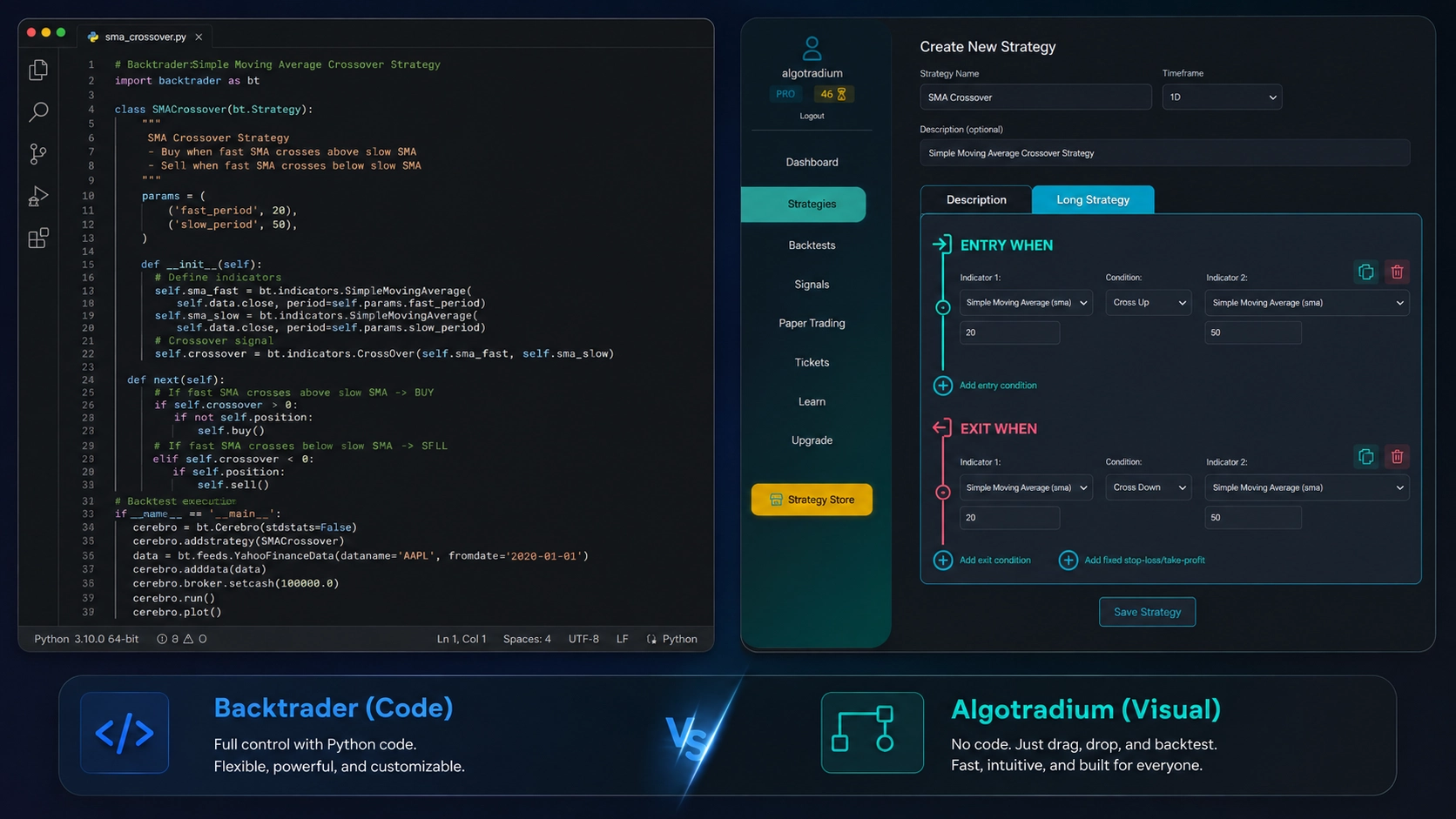
Backtrader requires coding; Algotradium offers a visual drag-and-drop interface.
So, is Backtrader the right choice for you? If you're building a production-grade trading system and you're comfortable with Python, yes. If you want to quickly test an idea without writing a novel's worth of code, maybe start with backtesting.py or Algotradium. Either way, Backtrader remains a cornerstone of the Python backtesting ecosystem – the workhorse that just keeps going.
Let me introduce you to the speed freak of the Python backtesting world. VectorBT is that friend who shows up to the party in a souped-up race car while everyone else is riding bicycles. It's built from the ground up for one thing: raw, blistering speed. And boy, does it deliver.
VectorBT (short for Vectorized Backtesting) takes a fundamentally different approach than the event-driven libraries we've talked about. Instead of looping through each bar one by one—which is like reading a book one word at a time—it applies operations to entire arrays at once. Think of it as reading the whole page in a single glance. This vectorized approach, combined with Numba (a just-in-time compiler that turns Python into machine code), means you can backtest thousands of parameter combinations in seconds. Not minutes. Not hours. Seconds.
I remember the first time I used it. I was working on a momentum strategy across 50 stocks with 5 years of daily data. With backtesting.py, each parameter set took about 10 minutes. I had 100 combinations to test. Do the math—that's over 16 hours. With VectorBT? The entire optimization ran in under 30 seconds. I literally blinked and missed it. That kind of speed doesn't just save time; it changes how you approach research. You start asking "what if?" more often because the cost of finding out is basically zero.
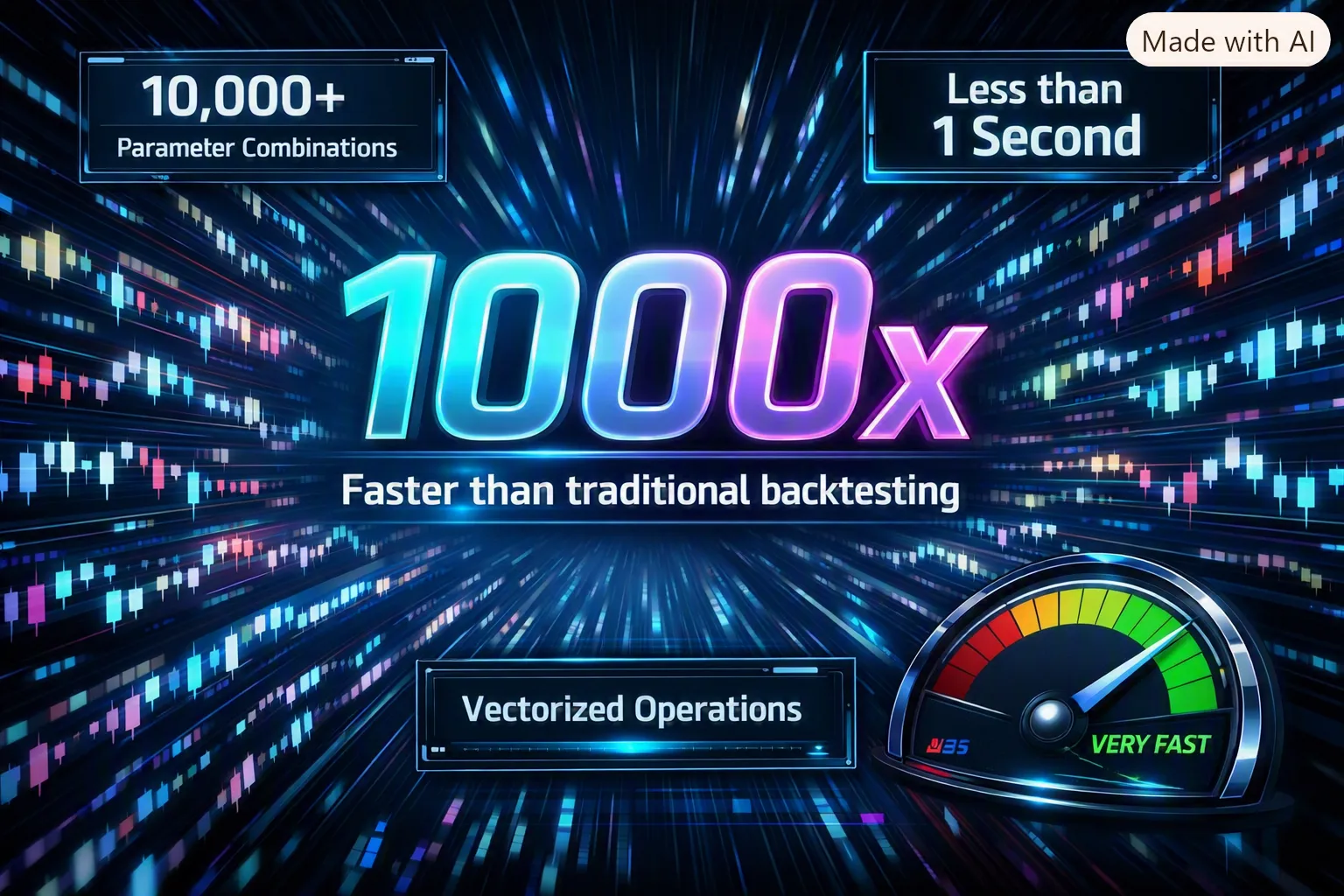
Image: Animated GIF showing a VectorBT backtest running through thousands of parameter combinations in seconds, with a speedometer in the corner showing "1000x faster
Under the hood, VectorBT treats your price data as NumPy arrays and applies mathematical operations across the entire dataset simultaneously. Instead of writing a loop like:
for i in range(len(data)):
    if sma_fast[i] > sma_slow[i]:
        buy()
You write something like:
entries = sma_fast > sma_slow
That single line generates an entire array of True/False values for every bar in your dataset. No loops. No iteration. Just pure, vectorized math. It's more like writing pandas or NumPy code than defining a traditional strategy class.
This approach has some serious advantages beyond speed. Because everything is array-based, you can easily parallelize operations across multiple assets. VectorBT has built-in support for portfolio backtesting, so you can test strategies across hundreds of instruments simultaneously. Want to know how your mean-reversion strategy performs on every stock in the S&P 500? VectorBT can do that in one go.
Let me walk you through a concrete example. Say you want to find the best combination of fast and slow moving averages for a crossover strategy on Apple stock. With VectorBT, you'd do something like this:
import vectorbt as vbt
import pandas as pd

# Get price data (you'd normally fetch this)
price = pd.Series(...)  # Your price data here

# Define parameter ranges
fast_ma = [10, 20, 30, 40, 50]
slow_ma = [50, 100, 150, 200]

# Vectorized backtest across ALL combinations
entries = vbt.MA.run(price, window=fast_ma).ma_crossed_above(
    vbt.MA.run(price, window=slow_ma).ma
)

exits = vbt.MA.run(price, window=fast_ma).ma_crossed_below(
    vbt.MA.run(price, window=slow_ma).ma
)

# Run the portfolio simulation
pf = vbt.Portfolio.from_signals(price, entries, exits)

# Get Sharpe ratio for all 20 combinations
print(pf.sharpe_ratio())
That's it. In about 10 lines of code, you've tested 20 different parameter combinations. The result is a DataFrame where each column is a different parameter set, and each row is a bar. You can then find the combination with the highest Sharpe ratio, sortino ratio, or any other metric you care about.
| Task | backtesting.py | Backtrader | VectorBT |
|---|---|---|---|
| Single strategy, 10 years daily data | ~2 seconds | ~3 seconds | ~0.1 seconds |
| 100 parameter combinations | ~3 minutes | ~5 minutes | ~2 seconds |
| Portfolio of 50 assets | Not built for this | ~30 seconds | ~1 second |
| Hyperparameter optimization (1000 combos) | Would take hours | Would take hours | ~20 seconds |
Okay, I've been singing VectorBT's praises, but let me be real with you. This library has a learning curve that would make a mountain goat nervous. The API is completely different from what you're used to with event-driven libraries. You're not defining a strategy class with init() and next() methods. Instead, you're working with DataFrames, NumPy arrays, and vectorized expressions. It's more like writing pandas code than defining a trading strategy.
Here's what I mean. In backtesting.py, you'd write:
class SmaCross(Strategy):
    def init(self):
        self.sma1 = self.I(SMA, self.data.Close, 10)
        self.sma2 = self.I(SMA, self.data.Close, 20)

    def next(self):
        if crossover(self.sma1, self.sma2):
            self.buy()
        elif crossover(self.sma2, self.sma1):
            self.sell()
In VectorBT, it's more like:
entries = vbt.MA.run(price, window=10).ma_crossed_above(
    vbt.MA.run(price, window=20).ma
)
exits = vbt.MA.run(price, window=10).ma_crossed_below(
    vbt.MA.run(price, window=20).ma
)
pf = vbt.Portfolio.from_signals(price, entries, exits)
See the difference? VectorBT is more functional and array-oriented. It's powerful once you get it, but the initial learning curve can be frustrating. You'll find yourself Googling "how to do X in VectorBT" a lot at first.
Here's another thing to watch out for. Because VectorBT makes it so easy to test thousands of parameter combinations, it's dangerously easy to overfit. You might find a parameter set that looks amazing in-sample—a Sharpe ratio of 3.5, perfect equity curve, the works. But when you test it out-of-sample, it falls apart completely.
I've been there. I once optimized a strategy with 500 parameter combinations and found one that had a 90% win rate and a 4.0 Sharpe ratio over 10 years of data. I was ready to quit my day job. Then I tested it on the next 2 years of data, and it lost 30% of its value in 6 months. The problem wasn't the strategy—it was that I had tried so many combinations that I was bound to find one that fit the noise perfectly.
VectorBT doesn't protect you from this. In fact, it enables it. You need to be disciplined about your optimization process. Use walk-forward analysis, out-of-sample testing, and realistic transaction costs. And for goodness' sake, don't trust any backtest that hasn't been validated on unseen data.
VectorBT's speed is a double-edged sword. It lets you explore more ideas faster, but it also makes it easier to fool yourself. Always follow these rules:
VectorBT is perfect for quants and researchers who need to run massive backtests quickly. If you're doing hyperparameter optimization, testing strategies across multiple assets, or exploring complex portfolio constructions, VectorBT is your best friend. It's also great for machine learning practitioners who need to quickly evaluate feature sets or model parameters.
But if you're just testing a single strategy on one instrument, VectorBT might be overkill. It's like using a Formula 1 car to drive to the grocery store. Sure, it'll get you there fast, but you're paying for a lot of capability you don't need. For simple backtests, backtesting.py or Backtrader are more than adequate and much easier to learn.
VectorBT also has a steeper learning curve than the other libraries we've covered. If you're new to Python backtesting, I'd recommend starting with backtesting.py first, then graduating to VectorBT once you've mastered the basics. And if you want a deeper understanding of the whole backtesting workflow, check out our complete guide to Python backtesting.
| ⭐ Best For | Hyperparameter optimization, multi-asset backtesting, research |
| ⚡ Speed | Extremely fast (vectorized + Numba JIT compilation) |
| 📚 Learning Curve | Steep (different paradigm from event-driven libraries) |
| 📊 Portfolio Support | Excellent (built-in multi-asset backtesting) |
| 🔧 Customization | High (but requires understanding of vectorized operations) |
| 📈 Live Trading | Not built for it (research-focused) |
| 👥 Community | Growing, active on GitHub and Discord |
So, is VectorBT the right choice for you? If you're doing serious quantitative research and need to test hundreds or thousands of ideas quickly, absolutely. If you're just getting started or testing a simple strategy, maybe hold off. But once you experience that speed—once you see a full optimization run in the time it takes to blink—you'll never want to go back.
If you've been around the algorithmic trading block for a while, you've probably heard of Quantopian. It was the place where aspiring quants went to compete, share ideas, and backtest strategies using real historical data. When Quantopian shut down in 2020, a lot of people thought that was the end of the road for its backtesting engine, Zipline. But here's the thing: open-source software doesn't just disappear. Zipline lives on, maintained by a community of dedicated developers and quants who refuse to let it die.
So, what exactly is Zipline? It's an event-driven backtesting library, much like Backtrader, but with a few key differences. First, it was built specifically for US equities, and it shows. The library has a built-in data bundle system that lets you download free data from sources like Quandl (now part of Nasdaq) or use your own custom datasets. It also integrates seamlessly with PyFolio, a performance analysis library that spits out detailed reports with all the metrics you'd expect—Sharpe ratio, drawdowns, annualized returns, you name it.
💡 Quick Tip: If you're new to backtesting and want a step-by-step introduction, check out our Simple Python Backtesting Tutorial for Beginners. It covers the basics using backtesting.py, but the concepts apply to Zipline too.
One area where Zipline absolutely shines is handling corporate actions. Think about it: if you're backtesting a long-term strategy on individual stocks, you need to account for stock splits, dividends, mergers, and spin-offs. Get that wrong, and your backtest results are garbage. Zipline handles all of this automatically. It adjusts prices for splits, adds dividends to your cash balance, and even handles delistings. That's a big deal if you're running a 10-year backtest on a portfolio of 50 stocks.
Another strength is minute-level data support. Most libraries work fine with daily data, but if you're building an intraday strategy—say, a mean reversion strategy that trades on 5-minute bars—Zipline has you covered. It can handle multiple timeframes within the same backtest, which is more flexible than you might think.
Alright, let's be real. Zipline has some serious drawbacks. First, the installation process is a nightmare. You'll need to install a bunch of dependencies, including TA-Lib (which is a pain on Windows), and the documentation assumes you already know your way around the Quantopian ecosystem. If you're a beginner, you might spend more time setting up Zipline than actually backtesting.
Second, the library isn't as actively maintained as Backtrader or backtesting.py. Some features are broken or outdated, and the community is smaller. If you run into a bug, you might be waiting a while for a fix—or you'll have to fix it yourself.
Finally, Zipline's focus on US equities can be a limitation. If you want to backtest crypto strategies or trade on international markets, you'll need to jump through hoops to get the data in the right format. It's doable, but it's not as straightforward as with other libraries.
Let's see Zipline in action. Here's a basic moving average crossover strategy:
from zipline.api import order_target, record, symbol
from zipline import run_algorithm
import pandas as pd
import numpy as np

def initialize(context):
    context.asset = symbol('AAPL')
    context.short_window = 20
    context.long_window = 50

def handle_data(context, data):
    # Get historical prices
    short_mavg = data.history(context.asset, 'price', context.short_window, '1d').mean()
    long_mavg = data.history(context.asset, 'price', context.long_window, '1d').mean()

    # Trading logic
    if short_mavg > long_mavg:
        order_target(context.asset, 100)  # Buy 100 shares
    elif short_mavg < long_mavg:
        order_target(context.asset, 0)   # Sell all

    # Record for analysis
    record(AAPL=data.current(context.asset, 'price'),
           short_mavg=short_mavg,
           long_mavg=long_mavg)

# Run the backtest (you'd need to set up a data bundle first)
# results = run_algorithm(start=pd.Timestamp('2020-01-01'),
#                         end=pd.Timestamp('2024-12-31'),
#                         initialize=initialize,
#                         handle_data=handle_data,
#                         capital_base=100000,
#                         bundle='custom_bundle')
Notice how the code structure is similar to Backtrader? That's because both are event-driven. But Zipline uses a different API—you define initialize and handle_data functions instead of creating a strategy class. It's a matter of preference, but some people find Zipline's approach more intuitive.
| Feature | Zipline | Backtrader |
|---|---|---|
| Ease of Setup | Difficult | Easy |
| Corporate Actions | Excellent | Manual |
| Minute Data | Built-in | Requires setup |
| Community Size | Small | Large |
| Active Maintenance | Low | High |
| Best For | Long-term US equity strategies | General purpose, any asset |
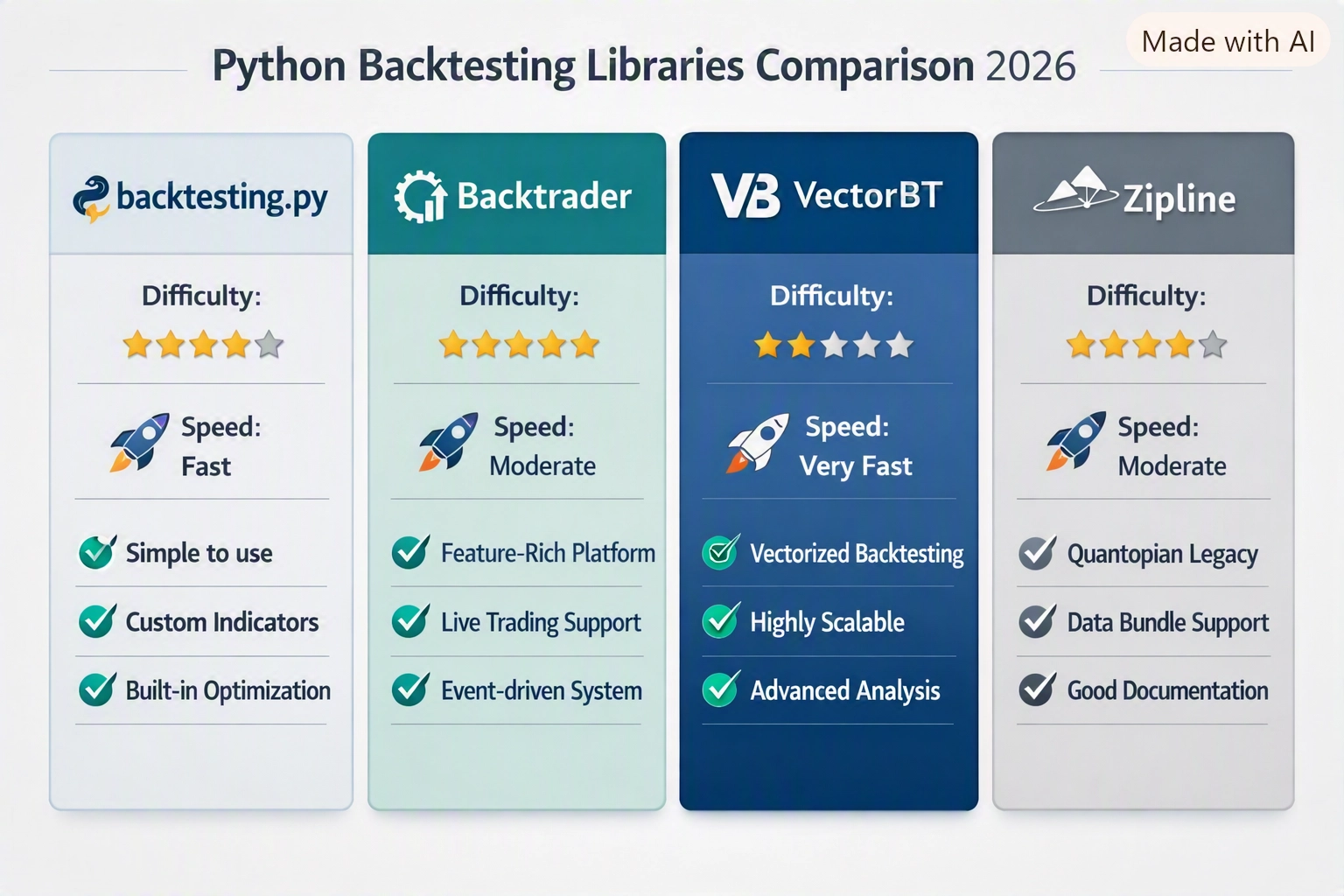
Figure 1: A visual comparison of Zipline and Backtrader features. Zipline wins on corporate actions, but Backtrader is easier to set up.
Here's my honest take: if you're already comfortable with Zipline and have a library of strategies written for it, stick with it. It's still a solid tool for US equity backtesting, especially if you need robust corporate action handling. But if you're starting a new project today, I'd lean towards Backtrader or backtesting.py. They're easier to set up, better maintained, and more flexible.
That said, there's one scenario where Zipline still makes sense: if you're building a system that needs to handle complex corporate actions at scale. For example, if you're backtesting a dividend capture strategy across hundreds of stocks over 20 years, Zipline's automatic adjustments will save you weeks of work. In that case, the pain of setup might be worth it.
And hey, if you're looking for a platform that combines the power of Zipline with a modern, user-friendly interface, you might want to check out Algotradium. It's an all-in-one backtesting platform that handles data, execution, and analysis—no installation required. We'll talk more about it later in this article.
For now, remember: Zipline is a legacy tool with a loyal following. It's not perfect, but it's free, open-source, and still gets the job done for certain use cases. Just don't expect it to be your go-to library for every project.
So we've covered the heavy hitters—backtesting.py, Backtrader, VectorBT, and Zipline. But the Python ecosystem is vast, and a few other libraries deserve a shout-out. Maybe you trade crypto exclusively, or you prefer a cloud-based environment where you don't have to manage servers. Or perhaps you just want something ultra-lightweight for quick portfolio tests. Whatever your niche, there's a tool for you. Let's look at four more options that fill specific gaps.
If you're into cryptocurrency trading, you've probably heard of Freqtrade. It's not just a backtesting library—it's a full-blown trading bot that can run 24/7 on your VPS. But it also includes a solid backtesting engine. You write strategies in Python, define buy/sell signals, and then run a backtest against historical crypto data. Freqtrade handles exchange fees, slippage, and even supports multiple timeframes.
Here's a minimal strategy example:
from freqtrade.strategy import IStrategy
import talib

class SimpleSMAStrategy(IStrategy):
    timeframe = '5m'
    minimal_roi = {"0": 0.01}
    stoploss = -0.05

    def populate_indicators(self, dataframe, metadata):
        dataframe['sma50'] = talib.SMA(dataframe['close'], timeperiod=50)
        dataframe['sma200'] = talib.SMA(dataframe['close'], timeperiod=200)
        return dataframe

    def populate_buy_trend(self, dataframe, metadata):
        dataframe.loc[
            (dataframe['sma50'] > dataframe['sma200']),
            'buy'] = 1
        return dataframe

    def populate_sell_trend(self, dataframe, metadata):
        dataframe.loc[
            (dataframe['sma50'] < dataframe['sma200']),
            'sell'] = 1
        return dataframe
You then run freqtrade backtesting --strategy SimpleSMAStrategy and get a detailed report with profit, drawdown, and trade logs. Freqtrade also has a nice web UI for monitoring live trades. The downside? It's crypto-only and requires some setup. But if you live and breathe crypto, it's a fantastic all-in-one solution.
QuantConnect is a cloud-based algorithmic trading platform that uses the LEAN engine under the hood. You write algorithms in Python (or C#) and run them on their servers. No local installation, no data downloads—just a browser and an internet connection. It supports equities, options, futures, forex, and crypto. The backtesting environment is incredibly realistic, with minute and tick data, transaction costs, and even corporate actions.
Here's a simple moving average crossover algorithm in QuantConnect:
class MovingAverageCross(QCAlgorithm):
    def Initialize(self):
        self.SetStartDate(2020, 1, 1)
        self.SetEndDate(2025, 12, 31)
        self.SetCash(100000)
        self.symbol = self.AddEquity("SPY", Resolution.Daily).Symbol
        self.fast = self.SMA(self.symbol, 50, Resolution.Daily)
        self.slow = self.SMA(self.symbol, 200, Resolution.Daily)

    def OnData(self, data):
        if not self.fast.IsReady or not self.slow.IsReady:
            return
        if self.fast.Current.Value > self.slow.Current.Value:
            self.SetHoldings(self.symbol, 1.0)
        else:
            self.Liquidate(self.symbol)
QuantConnect is ideal if you don't want to worry about infrastructure. Their free tier gives you limited compute time, but paid plans offer more. It's also great for collaboration—you can share strategies with the community. The trade-off? You're tied to their platform, and you can't run backtests offline.
PyAlgoTrade is a lesser-known but capable library that follows an event-driven architecture, similar to Backtrader but simpler. It's great for learning the event-driven paradigm without the complexity. You define a strategy class with handlers for bar events, and the library calls them as data flows in. It supports multiple data feeds, slippage models, and commission schemes.
Example:
from pyalgotrade import strategy
from pyalgotrade.barfeed import yahoofeed

class MyStrategy(strategy.BacktestingStrategy):
    def __init__(self, feed, instrument):
        super().__init__(feed)
        self.__instrument = instrument

    def onBars(self, bars):
        bar = bars[self.__instrument]
        self.info("Close: %.2f" % bar.getClose())

feed = yahoofeed.Feed()
feed.addBarsFromCSV("AAPL", "aapl-2020.csv")
strat = MyStrategy(feed, "AAPL")
strat.run()
PyAlgoTrade is lightweight and easy to understand, but it lacks the advanced features of Backtrader or VectorBT. It's best for educational purposes or simple strategies. The community is small, so you're mostly on your own for troubleshooting.
bt (short for "backtesting") by PMT is a vectorized library that focuses on portfolio-level backtesting. Think of it as a simpler, more portfolio-oriented cousin of VectorBT. You define a strategy by combining indicators and allocation rules, and bt runs the backtest in a few lines of code. It's perfect for testing asset allocation ideas or simple timing strategies.
Example:
import bt

# Create a strategy that buys SPY when its 50-day SMA > 200-day SMA
data = bt.get('spy,agg', start='2010-01-01')
sma = data.rolling(50).mean()

signal = sma['spy'] > data['spy'].rolling(200).mean()

strategy = bt.Strategy('SMA Crossover', [
    bt.algos.RunOnce(),
    bt.algos.SelectWhere(signal),
    bt.algos.WeighEqually(),
    bt.algos.Rebalance()
])

backtest = bt.Backtest(strategy, data)
result = bt.run(backtest)
result.plot()
bt is great for quick experiments and portfolio-level analysis. It's not designed for complex multi-asset strategies with dynamic position sizing, but for 80% of retail use cases, it works fine. The documentation is decent, and the API is clean.
| Library | Type | Best For | Pros | Cons |
|---|---|---|---|---|
| Freqtrade | Full trading bot | Crypto traders who want a ready-made bot | Live trading, web UI, active community | Crypto-only, steep setup for beginners |
| QuantConnect | Cloud platform | Traders who prefer managed infrastructure | No local setup, multi-asset, realistic data | Paid tiers, internet required, vendor lock-in |
| PyAlgoTrade | Event-driven library | Learning event-driven backtesting | Simple, lightweight, good for education | Limited features, small community |
| bt | Vectorized portfolio library | Quick portfolio-level backtests | Minimal code, clean API, fast | Not for complex strategies, limited indicators |
Each of these libraries has its niche. Freqtrade is a no-brainer for crypto enthusiasts who want a bot that can trade live after backtesting. QuantConnect is perfect if you hate managing data feeds and servers. PyAlgoTrade and bt are great for learning or quick experiments. But let's be honest—for most retail traders, the four main libraries we covered earlier will be more than enough. If you're just starting out, I'd recommend sticking with backtesting.py or Backtrader. Need a step-by-step walkthrough? Check out our Simple Python Backtesting Tutorial for Beginners to get your hands dirty.
Alright, let's cut to the chase. You've got a handful of Python backtesting libraries, each with its own personality. Some are beginner-friendly, others are speed demons, and a few are legacy workhorses. Here's a quick snapshot to help you decide which one to bet on.
| Library | Ease of Use | Speed | Flexibility | Community | Best For |
|---|---|---|---|---|---|
| backtesting.py | ⭐⭐⭐⭐⭐ | ⭐⭐⭐ | ⭐⭐ | ⭐⭐⭐⭐ | Beginners, simple strategies |
| Backtrader | ⭐⭐⭐ | ⭐⭐⭐ | ⭐⭐⭐⭐⭐ | ⭐⭐⭐⭐⭐ | Complex strategies, live trading |
| VectorBT | ⭐⭐⭐ | ⭐⭐⭐⭐⭐ | ⭐⭐⭐⭐ | ⭐⭐⭐ | High-frequency, large datasets |
| Zipline | ⭐⭐ | ⭐⭐⭐ | ⭐⭐⭐⭐ | ⭐⭐ | US equities, corporate actions |
But a table only tells half the story. Let's break down each library with a quick code example and what makes it tick.
If you're just dipping your toes into algorithmic trading, start here. The API is clean, the documentation is solid, and you can go from zero to a backtest in under 10 lines of code. Check this out:
from backtesting import Backtest, Strategy
from backtesting.lib import crossover

class SmaCross(Strategy):
    def init(self):
        self.sma1 = self.I(lambda x: x.rolling(10).mean(), self.data.Close)
        self.sma2 = self.I(lambda x: x.rolling(20).mean(), self.data.Close)

    def next(self):
        if crossover(self.sma1, self.sma2):
            self.buy()
        elif crossover(self.sma2, self.sma1):
            self.sell()

bt = Backtest(GOOG, SmaCross, cash=10000)
stats = bt.run()
print(stats)
Simple, right? The downside? It's single-instrument only. No portfolio-level backtesting, no multi-asset magic. But for learning the ropes, it's unbeatable. Want a step-by-step walkthrough? Check out our Simple Python Backtesting Tutorial for Beginners.
Backtrader is the Swiss Army knife of backtesting. It handles multiple instruments, complex order types, live trading, and even has a built-in optimizer. The learning curve is steeper, but once you get the hang of it, you can build almost anything. Here's a snippet of a simple moving average crossover in Backtrader:
import backtrader as bt

class SmaCross(bt.Strategy):
    params = (('sma1', 10), ('sma2', 20),)

    def __init__(self):
        self.sma1 = bt.indicators.SMA(self.data.close, period=self.params.sma1)
        self.sma2 = bt.indicators.SMA(self.data.close, period=self.params.sma2)

    def next(self):
        if self.sma1 > self.sma2 and not self.position:
            self.buy()
        elif self.sma1 < self.sma2 and self.position:
            self.sell()

cerebro = bt.Cerebro()
cerebro.addstrategy(SmaCross)
cerebro.run()
Notice the extra boilerplate? That's the price of flexibility. But you get access to slippage models, commission schemes, and even live trading via brokers like Interactive Brokers. If you're serious about trading, Backtrader is a solid choice.
Need to test thousands of parameter combinations on years of data? VectorBT is your friend. It uses vectorized operations (think NumPy under the hood) to blast through backtests in seconds. The trade-off? You have to think in arrays, not loops. Here's a taste:
import vectorbt as vbt

price = vbt.YFData.download('AAPL').get('Close')
fast_ma = price.rolling(10).mean()
slow_ma = price.rolling(20).mean()
entries = fast_ma > slow_ma
exits = fast_ma < slow_ma

pf = vbt.Portfolio.from_signals(price, entries, exits)
print(pf.stats())
See how it's all about pandas-like operations? No explicit loop over bars. That's why it's lightning fast. But if you need custom logic per bar (like checking multiple conditions), you'll have to get creative. Still, for optimization and large-scale testing, VectorBT is king.
Zipline was the engine behind Quantopian, and it's still around for US equities backtesting with corporate actions (splits, dividends). But let's be honest: setup is a pain (you'll need to bundle data), and maintenance has been spotty since Quantopian shut down. Unless you have a specific need for corporate actions, I'd skip it. Here's a quick look:
from zipline.api import order_target_percent, symbol

def initialize(context):
    context.asset = symbol('AAPL')

def handle_data(context, data):
    order_target_percent(context.asset, 1.0)
It works, but you'll spend more time wrestling with data bundles than writing strategies. Not recommended for new projects.
Now, what about order types and slippage? All four libraries support market, limit, and stop orders. Backtrader and Zipline have more advanced order handling (like bracket orders, OCO). VectorBT's order model is simpler but sufficient for most strategies. Slippage models vary: Backtrader lets you define custom slippage per broker, while backtesting.py uses a fixed percentage by default. VectorBT uses a simple spread model. Choose based on how realistic you need your simulation to be.
So, which one should you pick? If you're just starting, go with backtesting.py. It's the easiest way to learn the basics of backtesting without getting bogged down. If you need a full-featured platform for complex strategies and live trading, Backtrader is your best bet. If speed is your priority and you're comfortable with vectorized thinking, VectorBT will blow your mind. And if you're dealing with US equities and corporate actions, Zipline still works, but be prepared for a bumpy ride.
For a deeper dive into the whole backtesting workflow, including data handling and performance metrics, check out our Python Backtesting: The Complete Guide (2026). It covers everything from setting up your environment to interpreting Sharpe ratios.
Remember, the best library is the one that fits your specific needs. Don't overthink it—pick one, start coding, and iterate. Happy backtesting!
Alright, so you've seen the contenders—backtesting.py, Backtrader, VectorBT, Zipline, and a few others. Now comes the hard part: which one do you actually use? The answer, as with most things in trading, is it depends. But don't worry—I'm going to walk you through a simple decision framework that'll make this choice a whole lot easier.
Think of it like picking a car. You wouldn't buy a Formula 1 car for your daily commute, and you wouldn't take a minivan to a track day. Same logic applies here. Let's break it down.
If you're new to Python and algorithmic trading, backtesting.py is your safest bet. Its API is clean, the documentation is beginner-friendly, and you can get a simple moving average crossover strategy running in under 20 lines of code. You'll learn the fundamentals without getting bogged down in complex event loops or data feed configurations.
Here's a quick example to show you what I mean:
from backtesting import Backtest, Strategy
from backtesting.lib import crossover
import pandas as pd

class SmaCross(Strategy):
    def init(self):
        self.sma1 = self.I(lambda x: pd.Series(x).rolling(10).mean(), self.data.Close)
        self.sma2 = self.I(lambda x: pd.Series(x).rolling(20).mean(), self.data.Close)

    def next(self):
        if crossover(self.sma1, self.sma2):
            self.buy()
        elif crossover(self.sma2, self.sma1):
            self.sell()

bt = Backtest(data, SmaCross, cash=10000, commission=.002)
results = bt.run()
print(results)
See? Clean, readable, and it just works. If you're a beginner, this tutorial will get you up and running in no time.
Simple moving average crossovers? Any library works. But if you're into multi-asset portfolios with rebalancing, you'll need Backtrader or VectorBT. Backtrader has built-in support for multiple data feeds and a robust broker simulation. VectorBT, on the other hand, is built for vectorized operations—perfect for testing hundreds of parameter combinations in seconds.
For high-frequency strategies where every millisecond counts, VectorBT's speed is essential. It processes data in arrays rather than looping through each bar, making it orders of magnitude faster.
If yes, Backtrader has the best live trading support with multiple brokers (Interactive Brokers, Oanda, etc.). It comes with a live trading mode that seamlessly transitions from backtesting to paper trading to real money. backtesting.py doesn't have built-in live trading, but you can build a wrapper around it. VectorBT is primarily for research—not live execution.
If you're testing on years of minute data across hundreds of instruments, VectorBT is your only realistic option. Its vectorized approach can handle millions of rows without breaking a sweat. For daily data on a few stocks, any library works fine.
If you get stuck, you want to find answers quickly. Backtrader and backtesting.py have active forums and Stack Overflow presence. VectorBT's community is smaller but helpful. For a deeper dive into the whole backtesting workflow, check out Python Backtesting: The Complete Guide (2026).
| Library | Best For | Speed | Live Trading | Learning Curve |
|---|---|---|---|---|
| backtesting.py | Beginners, simple strategies | Moderate | No (DIY) | Low |
| Backtrader | Complex strategies, live trading | Moderate | Yes | Medium |
| VectorBT | High-frequency, large data | Very High | No | Medium-High |
| Zipline | Research, Quantopian-style | Moderate | No | High |
Here's the thing—you don't have to marry a single library. Many quants use multiple tools for different tasks. Start with backtesting.py to learn the ropes. Once you hit its limits (and you will), graduate to Backtrader for more complex strategies and live trading. If you need raw speed for large-scale optimization, add VectorBT to your toolkit.
Think of it as a progression. You wouldn't start learning to drive in a Ferrari, right? Same with backtesting libraries. Build your foundation, then upgrade as your needs grow.
Still unsure? Here's a quick rule of thumb: if you're reading this article, you're probably a beginner or intermediate trader. Go with backtesting.py first. It's free, well-documented, and will teach you the core concepts without the overhead. When you're ready for more, the other libraries will be waiting.
And remember—the best library is the one you actually use. Don't overthink it. Pick one, start backtesting, and iterate. Your future self (and your portfolio) will thank you.
So, you've seen the heavy hitters—backtesting.py, Backtrader, VectorBT. They're powerful, no doubt. But let's be real: setting them up can feel like assembling IKEA furniture without the instructions. You need to source data, handle API limits, install dependencies, and debug cryptic errors. That's where Algotradium comes in. It's not a Python library in the traditional sense—it's a full backtesting platform that runs in your browser. But here's the kicker: it integrates with Python under the hood, so you can still write custom strategies in Python if you want. Think of it as the best of both worlds.
💡 Key Insight: Algotradium handles all the data sourcing and storage for you. No more downloading CSV files or dealing with API rate limits. It's like having a personal data butler.
First off, data management is a breeze. You don't need to worry about where to get historical prices, handling corporate actions, or cleaning messy datasets. Algotradium does all that heavy lifting. Second, it has a visual strategy builder for those who prefer drag-and-drop over coding. You can literally drag indicators onto a canvas and connect them to create trading rules. No Python required. But if you're a coder at heart, you can switch to Python scripting mode and implement custom indicators and logic. It's flexible like that.
Third, the performance reports are actually readable. I'm talking equity curves, drawdown charts, Sharpe ratios, and trade logs—all presented in clean, interactive charts. No more squinting at terminal output or wrestling with Matplotlib. And it supports multi-asset backtesting and walk-forward analysis, which is a godsend for anyone serious about strategy robustness.
For beginners, Algotradium is a fantastic way to get started without wrestling with library installations. You can be up and running in minutes, not hours. For advanced users, it offers Python scripting capabilities so you can implement custom indicators and logic. It's especially useful for traders who want to focus on strategy development rather than infrastructure. You know, the kind of people who'd rather spend their time tweaking entry rules than debugging pandas dataframes.
But is it a replacement for libraries like Backtrader? Not exactly. If you need full control over every aspect of your backtest—like custom order execution logic or exotic asset types—a library gives you that. But if you want a faster, more convenient workflow, Algotradium is worth considering. It's like the difference between building a car from scratch and buying a Tesla. Both get you there, but one is a lot more practical for daily use.
| Feature | Algotradium | Backtrader / backtesting.py |
|---|---|---|
| Setup time | Minutes (browser-based) | Hours (install, data sourcing) |
| Data management | Automatic | Manual (CSV, APIs) |
| Visual strategy builder | Yes (drag-and-drop) | No (code only) |
| Python scripting | Yes (optional) | Yes (required) |
| Multi-asset backtesting | Yes | Varies |
| Walk-forward analysis | Built-in | Manual implementation |
| Performance reports | Interactive charts | Basic plots / terminal |
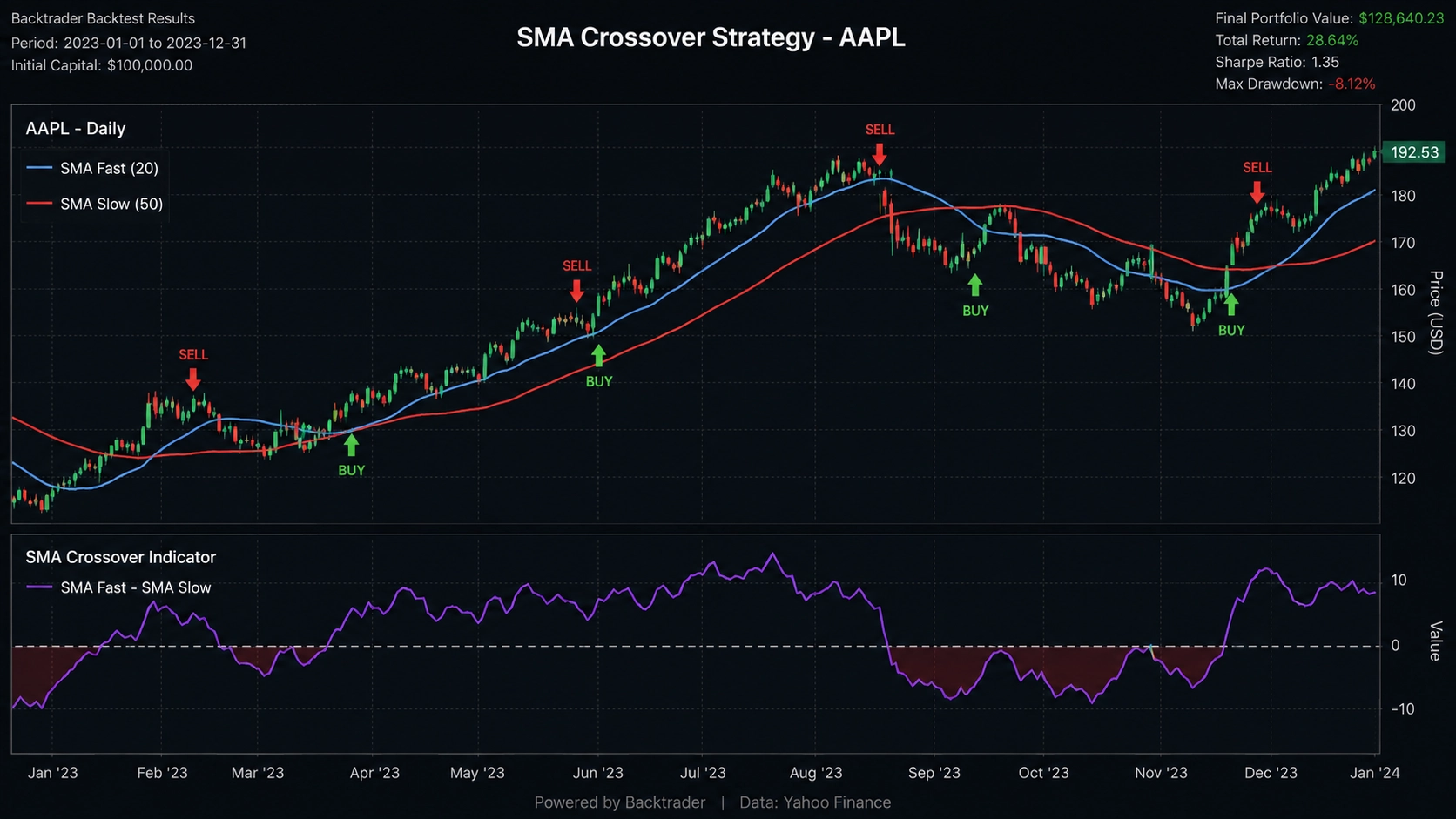
Figure 2: Backtest equity curve with trade markers showing buy and sell signals on a price chart
Let's say you want to backtest a simple moving average crossover strategy on Apple stock. In Algotradium, you'd open the visual builder, drag a "SMA 50" and "SMA 200" indicator onto the canvas, connect them to a "Buy when SMA 50 crosses above SMA 200" rule, and hit run. That's it. In Backtrader, you'd write something like this:
import backtrader as bt

class SmaCross(bt.Strategy):
    params = (('fast', 50), ('slow', 200),)

    def __init__(self):
        self.fast_ma = bt.indicators.SMA(self.data.close, period=self.params.fast)
        self.slow_ma = bt.indicators.SMA(self.data.close, period=self.params.slow)
        self.crossover = bt.indicators.CrossOver(self.fast_ma, self.slow_ma)

    def next(self):
        if not self.position:
            if self.crossover > 0:
                self.buy()
        elif self.crossover < 0:
            self.sell()

cerebro = bt.Cerebro()
cerebro.addstrategy(SmaCross)
data = bt.feeds.YahooFinanceData(dataname='AAPL', fromdate=datetime(2020,1,1), todate=datetime(2023,1,1))
cerebro.adddata(data)
cerebro.run()
cerebro.plot()
Both work, but which one would you rather do at 2 AM after a long day of trading? Exactly.
Algotradium shines when you want to iterate quickly. Got a new idea? Drag, drop, run, see results. Tweak, run again. It's perfect for strategy exploration and for traders who aren't full-time programmers. It's also great for teams—you can share strategies and results without sending around Jupyter notebooks. And if you're coming from MetaTrader, you'll feel right at home. In fact, we've written a detailed comparison of Backtesting in MetaTrader vs Algotradium that covers the differences in depth.
But if you're building a production trading system that needs to run on a server with custom order routing, you'll still need a library like Backtrader. Algotradium is more of a development and research tool—it's where you validate ideas before you code them into a live system.
⚠️ Heads up: Algotradium isn't open-source, so you can't modify its internals. But for most traders, that's a feature, not a bug—you don't want to be debugging the platform itself.
Ready to give it a spin? Head over to Algotradium's website and sign up for a free account. You'll get access to historical data for stocks, ETFs, forex, and crypto. No credit card required. And if you're new to backtesting altogether, check out our Python Backtesting: The Complete Guide (2026) for a broader overview of the ecosystem. Or if you want a step-by-step tutorial, our Simple Python Backtesting Tutorial for Beginners (2026) walks you through your first backtest using backtesting.py—and then shows you how to do the same thing in Algotradium in half the time.
So, is Algotradium the right tool for you? If you value speed, convenience, and readability over absolute control, then yes. It's not a replacement for the libraries we've discussed—it's a complement. Use it to prototype ideas, then implement the winners in your library of choice. Or just use it for everything if it fits your workflow. After all, the best tool is the one you actually use.
So, you've made it through the whole comparison—nice work! Let's pull everything together. Choosing the right Python backtesting library isn't about finding the "best" one overall; it's about matching the tool to your goals, experience, and strategy complexity. Here's the quick and dirty recap.
| Library | Best For | Key Strength |
|---|---|---|
| backtesting.py | Beginners, quick prototyping | Dead simple API, great docs |
| Backtrader | Complex strategies, live trading | Battle-tested, huge community |
| VectorBT | Speed demons, parameter optimization | Blazing fast vectorized operations |
| Zipline | Legacy projects, Quantopian refugees | Event-driven, well-documented |
| Algotradium | No-code / low-code backtesting | All-in-one platform, no setup |
If you're just getting started, backtesting.py is your best friend. It's like training wheels for algorithmic trading—you can write a moving average crossover strategy in under 20 lines of code. Check out our Simple Python Backtesting Tutorial for Beginners to see it in action.
For more serious work—say, a multi-asset portfolio with dynamic position sizing and live trading—Backtrader is the workhorse you can rely on. It's been around for years, has a massive community, and handles everything from slippage to custom commission schemes. But be warned: the learning curve is steeper.
Need speed? VectorBT is your jam. It uses vectorized operations (think NumPy on steroids) to run thousands of backtests in seconds. Perfect for hyperparameter optimization or scanning hundreds of symbols. Just remember: vectorized backtests can hide some real-world nuances like order queue effects.
And what about Zipline? It's still kicking, but mostly for folks who cut their teeth on Quantopian. Unless you have a specific reason to use it, I'd steer clear for new projects.
Here's a little secret: many professional quants don't stick to one library. They prototype in backtesting.py, then port to Backtrader for production, and use VectorBT for parameter sweeps. It's not cheating—it's being smart about your tools.
Let's see how simple a backtest can be. Here's a minimal example using backtesting.py:
from backtesting import Backtest, Strategy
from backtesting.lib import crossover
import pandas as pd

class SmaCross(Strategy):
    def init(self):
        self.sma1 = self.I(pd.Series.rolling, self.data.Close, 10)
        self.sma2 = self.I(pd.Series.rolling, self.data.Close, 20)

    def next(self):
        if crossover(self.sma1, self.sma2):
            self.buy()
        elif crossover(self.sma2, self.sma1):
            self.sell()

bt = Backtest(data, SmaCross, cash=10000, commission=.002)
results = bt.run()
print(results)
bt.plot()
That's it. 15 lines and you've got a backtest with equity curve, trades, and performance metrics. Compare that to setting up a full event-driven engine—it's night and day.
But here's the thing: backtesting is only half the battle. You also need to avoid overfitting, account for transaction costs, and validate your strategies out-of-sample. It's easy to get a killer backtest curve that falls apart in live trading. For a deeper dive into these pitfalls, read our Python Backtesting: The Complete Guide (2026).
And if you'd rather skip the coding altogether? Algotradium offers a visual backtesting platform that abstracts away the technical details. You can drag-and-drop indicators, set entry/exit rules, and run backtests without writing a single line of Python. It's perfect for traders who want to focus on strategy logic, not library quirks.
So, what's the takeaway? Start simple, iterate fast, and don't be afraid to mix libraries. Backtesting is a journey—enjoy the ride, and may your Sharpe ratios be high!
If you're just starting out, backtesting.py is hands-down the best choice. Its API is clean, the documentation is beginner-friendly, and you can get a basic strategy running in minutes. Here's a quick example of a simple moving average crossover:
from backtesting import Backtest, Strategy
from backtesting.lib import crossover
import pandas as pd

class SmaCross(Strategy):
    def init(self):
        self.sma1 = self.I(lambda x: pd.Series(x).rolling(10).mean(), self.data.Close)
        self.sma2 = self.I(lambda x: pd.Series(x).rolling(20).mean(), self.data.Close)

    def next(self):
        if crossover(self.sma1, self.sma2):
            self.buy()
        elif crossover(self.sma2, self.sma1):
            self.sell()

data = pd.read_csv('ohlc.csv', index_col=0, parse_dates=True)
bt = Backtest(data, SmaCross, cash=10000, commission=.002)
results = bt.run()
print(results)
That's it – you've backtested a strategy! It's a great way to learn the fundamentals without getting overwhelmed. For a step-by-step walkthrough, check out our Simple Python Backtesting Tutorial for Beginners. Just keep in mind that backtesting.py is limited to single-instrument, single-timeframe strategies – perfect for learning, but you'll outgrow it fast.
Not directly. backtesting.py is designed exclusively for historical backtesting. However, you can absolutely reuse the same strategy logic with a broker API to build a live trading system. Some community projects have attempted to add live trading support, but it's not a built-in feature. If you want a seamless transition from backtesting to live trading, consider Backtrader (which has live trading capabilities) or a platform like Algotradium that handles both. For most beginners, though, mastering backtesting first is the right move.
VectorBT uses vectorized operations and Numba (a just-in-time compiler) to process entire arrays of data at once, rather than looping through each bar. This makes it orders of magnitude faster than event-driven libraries for certain types of backtests, especially parameter optimization. Here's a taste:
import vectorbt as vbt
import pandas as pd

price = pd.Series([100, 102, 101, 105, 107, 106, 110])
fast_ma = price.rolling(2).mean()
slow_ma = price.rolling(4).mean()
entries = fast_ma > slow_ma
exits = fast_ma < slow_ma

pf = vbt.Portfolio.from_signals(price, entries, exits)
print(pf.stats())
Notice how we didn't write a single loop? That's the power of vectorization. But beware – it can be memory-intensive with huge datasets. It's a trade-off: speed vs. flexibility.
Yes, absolutely. Backtrader is still actively maintained by its creator and the community. There are regular updates, bug fixes, and new features. The community forum is buzzing, and you'll find support for most issues within hours. It's a mature, battle-tested library that's been around for years – and it's not going anywhere. If you need a reliable workhorse for complex strategies, Backtrader is a solid bet.
Think of backtesting.py as a bicycle and Backtrader as a truck. Here's a quick comparison:
| Feature | backtesting.py | Backtrader |
|---|---|---|
| Learning curve | Low | Moderate to high |
| Multi-asset support | No | Yes |
| Multi-timeframe | No | Yes |
| Live trading | No | Yes (via broker APIs) |
| Advanced order types | Basic (market/limit) | Full suite (stop, trailing, etc.) |
| Best for | Beginners, simple strategies | Complex, production-ready systems |
So if you're just learning, start with the bicycle. When you need to haul heavy loads, upgrade to the truck.
Yes, all of these libraries require Python programming knowledge. You'll need to understand classes, functions, and basic data manipulation with pandas. If you're new to Python, consider learning the basics first – or use a visual platform like Algotradium that lets you build and backtest strategies without writing code. But honestly, learning Python is a fantastic investment for any algorithmic trader. It opens up endless possibilities.
Absolutely. All the libraries mentioned work with any time series data, including crypto prices. You'll need to source your own data (e.g., from Binance or CoinGecko) and format it appropriately. Some libraries have built-in data connectors for crypto exchanges. Here's an example using backtesting.py with crypto data:
import pandas as pd
from backtesting import Backtest, Strategy

# Assume you've downloaded BTC/USDT daily data
data = pd.read_csv('btc_usdt.csv', index_col=0, parse_dates=True)

class BuyAndHold(Strategy):
    def init(self):
        pass
    def next(self):
        if not self.position:
            self.buy()

bt = Backtest(data, BuyAndHold, cash=1000, commission=.001)
results = bt.run()
print(results)
Just remember that crypto markets are 24/7, so your backtest should account for that. Also, transaction costs can be higher on some exchanges – always include realistic fees.
Most libraries allow you to set commission and slippage models. In backtesting.py, you pass a commission parameter (as a percentage or fixed amount). In Backtrader, you define a commission scheme using CommissionInfo. VectorBT has built-in slippage and fee models. Here's an example with backtesting.py:
bt = Backtest(data, MyStrategy, cash=10000, commission=.002) # 0.2% per trade
Always include realistic costs – otherwise you'll overestimate profits and get crushed in live trading. A good rule of thumb: use your broker's actual commission plus a small slippage buffer (e.g., 0.1% for liquid stocks).
The Sharpe ratio measures risk-adjusted return. It's calculated as (portfolio return - risk-free rate) / standard deviation of returns. A higher Sharpe ratio means better returns per unit of risk. Here's how you can calculate it in Python:
import numpy as np

returns = np.array([0.01, 0.02, -0.005, 0.015, 0.03])
risk_free_rate = 0.02  # 2% annual, adjust for period
sharpe = (np.mean(returns) - risk_free_rate) / np.std(returns)
print(f"Sharpe ratio: {sharpe:.2f}")
Why is it important? Because two strategies might have the same total return, but one might be much riskier. The Sharpe ratio helps you compare apples to apples. A Sharpe above 1 is decent, above 2 is great, and above 3 is suspicious – often a sign of overfitting.
Overfitting happens when you optimize parameters too much on historical data, making the strategy perform poorly in live trading. To avoid it:
For a deeper dive, check out our Python Backtesting: The Complete Guide. Platforms like Algotradium also have built-in overfitting detection tools that can help you spot problems before you go live. Remember: if it looks too good to be true, it probably is.