

In this guide, you'll learn the exact DataFrame structure Backtesting.py expects: backtesting.py data columns, required OHLCV fields, case sensitivity rules, how to rename columns, how to prepare yfinance data, and the most common data errors that break a backtest before it starts.
| Column | Required | Description | Example |
|---|---|---|---|
Open | Yes | Opening price | 100.5 |
High | Yes | Highest price | 103.2 |
Low | Yes | Lowest price | 99.8 |
Close | Yes | Closing price | 102.4 |
Volume | Optional | Trading volume | 152340 |
Column names are case sensitive: Open works, open does not. A DatetimeIndex is recommended for time-series data, although Backtesting.py can also work with a monotonic RangeIndex.
So you've decided to give Backtesting.py a shot. Good choice. It's a lightweight Python library that lets you test trading strategies against historical price data without a ton of ceremony. But before you can run your first backtest, you have to feed it data. And that's where a lot of people trip up.
The library expects a pandas DataFrame with a specific structure. Not just any data will do. You might have a CSV full of prices, or a DataFrame pulled from Yahoo Finance, but if the columns aren't named exactly right, Backtesting.py will throw an error before you even get to see a single trade.
The short version: you need Open, High, Low, and Close. Volume is optional. A DatetimeIndex is recommended, but not strictly mandatory if your index is monotonic. That's the whole game.
Backtesting.py asks your DataFrame one simple question: "Are you a clean, chronological OHLCV table?" If the answer is yes — with correctly named columns and a suitable index — you're ready to run. If not, you'll be debugging before you ever see a drawdown curve.
By the end of this guide, you'll know exactly what to plug into Backtest(): the right columns, the right capitalization, the right index, and how to handle messy real-world data. We'll walk through preparing a DataFrame from scratch, loading data from Yahoo Finance, and troubleshooting the most common errors.
If you'd rather see a complete working example before you build your own, our hands-on tutorial on how to backtest a trading strategy in Python with backtesting.py walks through the whole flow with real price data. For a broader foundation, the complete guide to Python backtesting covers data collection and strategy development in more detail.
Let's get that data in shape.
Why the DataFrame shape matters more than your strategy
Here's the thing: Backtesting.py is opinionated. It won't accept a Python list of dictionaries, a NumPy array, or a raw CSV file as your data source. You need a pandas DataFrame with the right column names and a suitable index. Get this right and the library does all the heavy lifting. Get it wrong and you'll be staring at a cryptic KeyError before your strategy even gets a chance to run.
The good news? Once you understand the pattern, it becomes second nature. Whether you're pulling data from Yahoo Finance, your broker, or a CSV you saved years ago, the preparation steps are the same.
DatetimeIndex is recommended for time-series data, although Backtesting.py can also work with a monotonic RangeIndexOpen, High, Low, CloseVolume, when volume data is needed by your strategy or indicatorsopen is different from OpenWhy does the index matter this much? Because Backtesting.py has to iterate over time. It needs to know which candle comes first and which comes second. For most financial datasets, a DatetimeIndex is the best choice because it preserves the actual timing of each bar and makes the resulting backtest easier to inspect. However, Backtesting.py can also work with a monotonic RangeIndex.
For time-series data, a sorted and appropriately indexed DataFrame is recommended. A DatetimeIndex is usually the best choice for market data. If you have duplicates or out-of-order dates, you may get strange results, so it's worth cleaning them up before running a backtest.
Here's a quick example of what a valid DataFrame looks like:
import pandas as pd

df = pd.DataFrame({
    "Open":  [100.0, 101.5, 102.0],
    "High":  [103.2, 104.8, 105.1],
    "Low":   [99.4, 100.1, 101.3],
    "Close": [102.7, 104.2, 103.9],
    "Volume": [150000, 175000, 168000]
}, index=pd.to_datetime(["2024-01-02", "2024-01-03", "2024-01-04"]))
print(df)
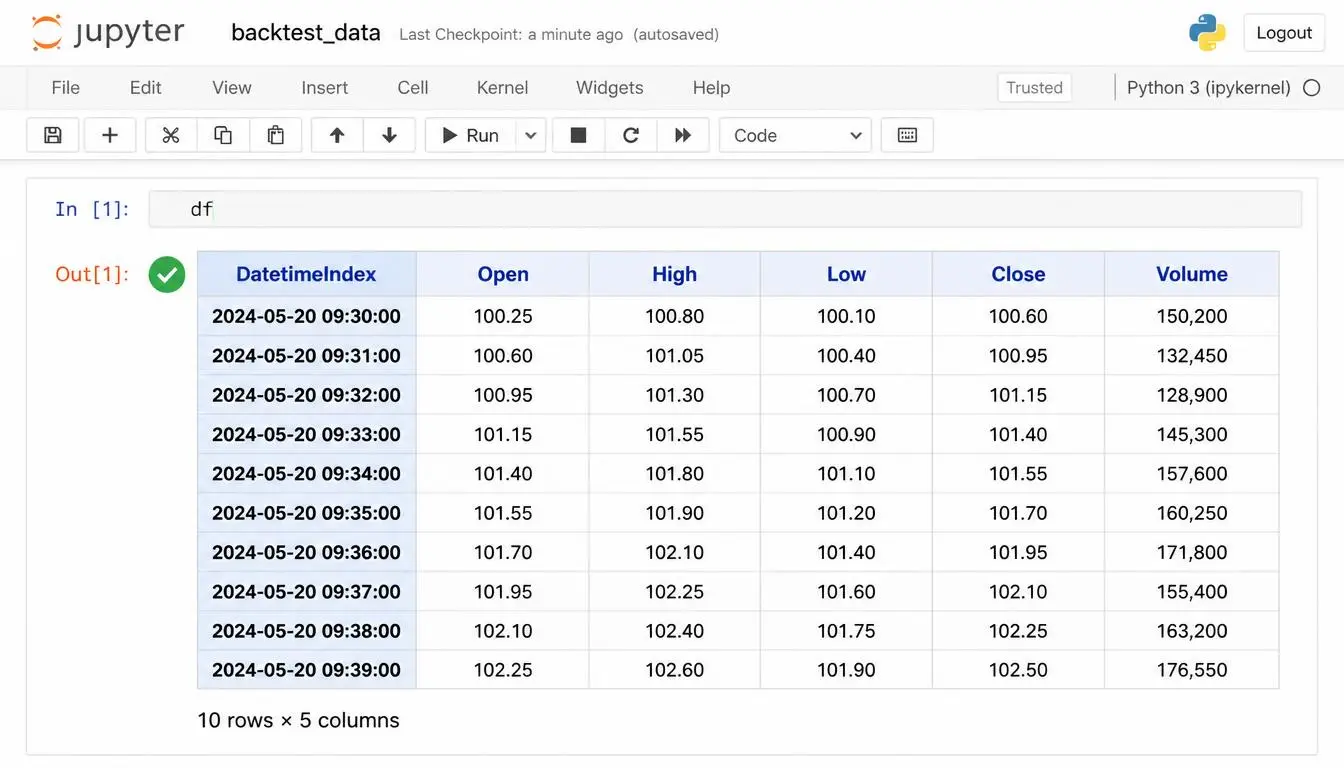
See what's going on here? The index holds the trading dates, and every row is one complete candle. The date is not a column in the data — it IS the index. That distinction causes a lot of confusion, especially if you're used to working with CSV files where the date sits in the first column.
Backtesting.py looks for column names with machine-like precision. It checks if "Open" exists, "High", "Low", and "Close". Technically these are the only four required. If you include "Volume", it has to be exactly that — no "volume", no "Vol", no abbreviation. And yes, they're case-sensitive. "OPEN" won't work, no matter how stylistically beautiful it looks.
Notice how all the price columns hold floats. You can use integers if your data is clean, but floats are more common in real-world market data. What you absolutely cannot have are strings, timestamps, or any object dtype hiding inside those columns. If your "Close" column contains something like "1,023.50" with a comma and a dollar sign, pandas won't complain — but Backtesting.py will.
NaN is your enemy here. Backtesting.py doesn't fill forward, interpolate, or magically heal broken bars. It expects a clean, gap-free dataset where every row is a complete candle. If a single row has a missing High or Close, that bar is unusable. Your backtest might crash, or worse, produce results that look fine but are subtly wrong.
Backtesting.py does not accept missing OHLC values, so you need to remove or appropriately fill incomplete rows before running the backtest. A targeted approach is usually best:
df = df.dropna(subset=["Open", "High", "Low", "Close"])
# If your strategy also needs Volume:
# df = df.dropna(subset=["Open", "High", "Low", "Close", "Volume"])
Close can create phantom signals. It's usually safer to drop missing bars entirely — especially if you're working with daily data where a one-day gap won't kill your strategy.Let's talk about dtypes for a moment. In practice, the prices from your broker or from yfinance arrive as floats. Volume often arrives as an integer. That's totally fine — Backtesting.py accepts both. But if you download data from a source that stores prices as strings (you know who you are), you'll need to convert them:
for col in ["Open", "High", "Low", "Close", "Volume"]:
    df[col] = pd.to_numeric(df[col], errors="coerce")

df = df.dropna(subset=["Open", "High", "Low", "Close"])
The errors="coerce" argument is a lifesaver. It turns anything non-numeric into NaN, and then you drop those rows. Simple, but effective.
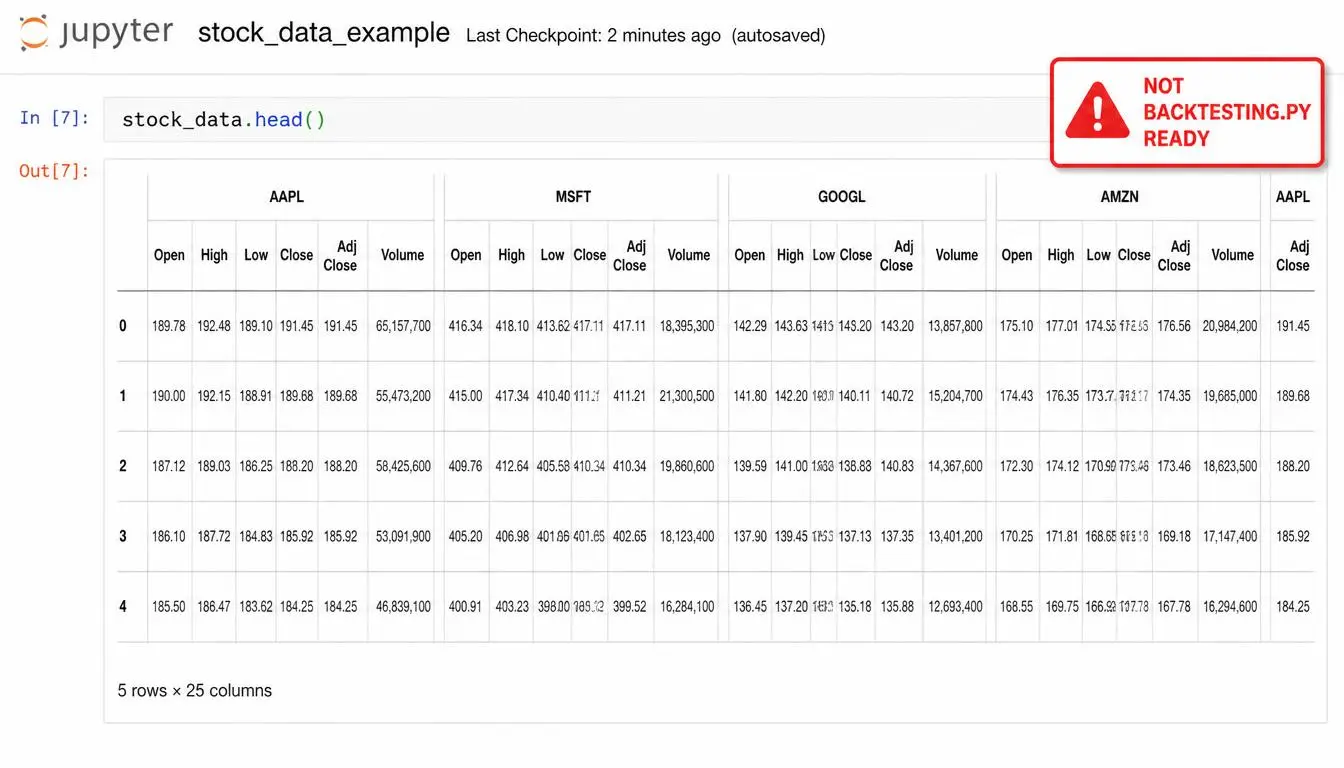
Using yfinance? Here's a gotcha: the downloaded DataFrame often comes with a MultiIndex on the columns, especially if you request multiple tickers. Backtesting.py expects a flat column index, so you need to flatten it first. Here's the cleanest way to prepare it:
import yfinance as yf
import pandas as pd

df = yf.download("AAPL", start="2023-01-01", end="2024-01-01")

if isinstance(df.columns, pd.MultiIndex):
    df.columns = df.columns.get_level_values(0)

df.index = pd.to_datetime(df.index)
df = df[["Open", "High", "Low", "Close", "Volume"]]
df = df.dropna(subset=["Open", "High", "Low", "Close"])
df.head()
The isinstance(df.columns, pd.MultiIndex) check is important: if the columns are already flat, you don't need to do anything. Only flatten when a MultiIndex is actually present.
If you're loading CSV data, you'll likely have a column named Date. When loading CSV data, it is usually best to explicitly parse the date column and set it as the index rather than relying on implicit conversion:
df = pd.read_csv("your_data.csv")
df["Date"] = pd.to_datetime(df["Date"])
df = df.set_index("Date")
df = df.sort_index()
df = df[["Open", "High", "Low", "Close", "Volume"]]
df = df.dropna(subset=["Open", "High", "Low", "Close"])
Make sure your DataFrame is ordered chronologically before running the backtest. Sorting the index with df.sort_index() helps ensure that price data is processed in the correct time sequence and can prevent unexpected backtesting results caused by incorrectly ordered data.
print(df.columns.tolist()) and print(df.index). Spending a few seconds on this can save you minutes of debugging.You can see that same pattern in action in this hands-on Backtesting.py tutorial, where we walk through preparing yfinance data for a live strategy. And if you're newer to the whole pipeline, the complete Python backtesting guide covers data collection, cleaning, and strategy development in one place.
So, to recap: one row per time period, a proper index, and OHLCV as exact, numeric columns. That's the format. Once your DataFrame fits that shape, you can stop wrestling with the library and actually start testing ideas. Which, let's be honest, is the part you actually care about.
Let's zoom in on the actual column names Backtesting.py expects. This is where a lot of first-time users trip up and end up staring at a KeyError that makes zero sense. The library is strict. It's not configurable. You can't call your opening price column 'first_trade' or your close column 'close' and expect it to just magically work. Here's the exact structure you need to feed it.
| Column | Required? | What it holds | Example value |
|---|---|---|---|
Open | Yes | Opening price of the period | 100.5 |
High | Yes | Highest price reached | 103.2 |
Low | Yes | Lowest price reached | 99.8 |
Close | Yes | Closing price of the period | 102.4 |
Volume | Optional | Number of shares or contracts | 152340 |
Notice that Volume is the only optional one. If your strategy checks volume signals, by all means include it. But if you don't have volume data, Backtesting.py won't complain. What about Open, High, Low, Close? They're all mandatory. No exceptions. And the names have to be capitalized exactly like that. A common mistake is using lowercase, or something like 'close' instead of 'Close'. That'll trigger a ValueError.
Backtesting.py requires the standard OHLC columns, but your DataFrame can also contain additional columns that your strategy uses, such as sentiment scores or custom indicators. The official documentation explicitly says the DataFrame can have extra columns, and these columns can be accessed by your Strategy. So don't feel like you have to strip everything down to exactly five columns — just make sure the required OHLC columns are present and correctly named.
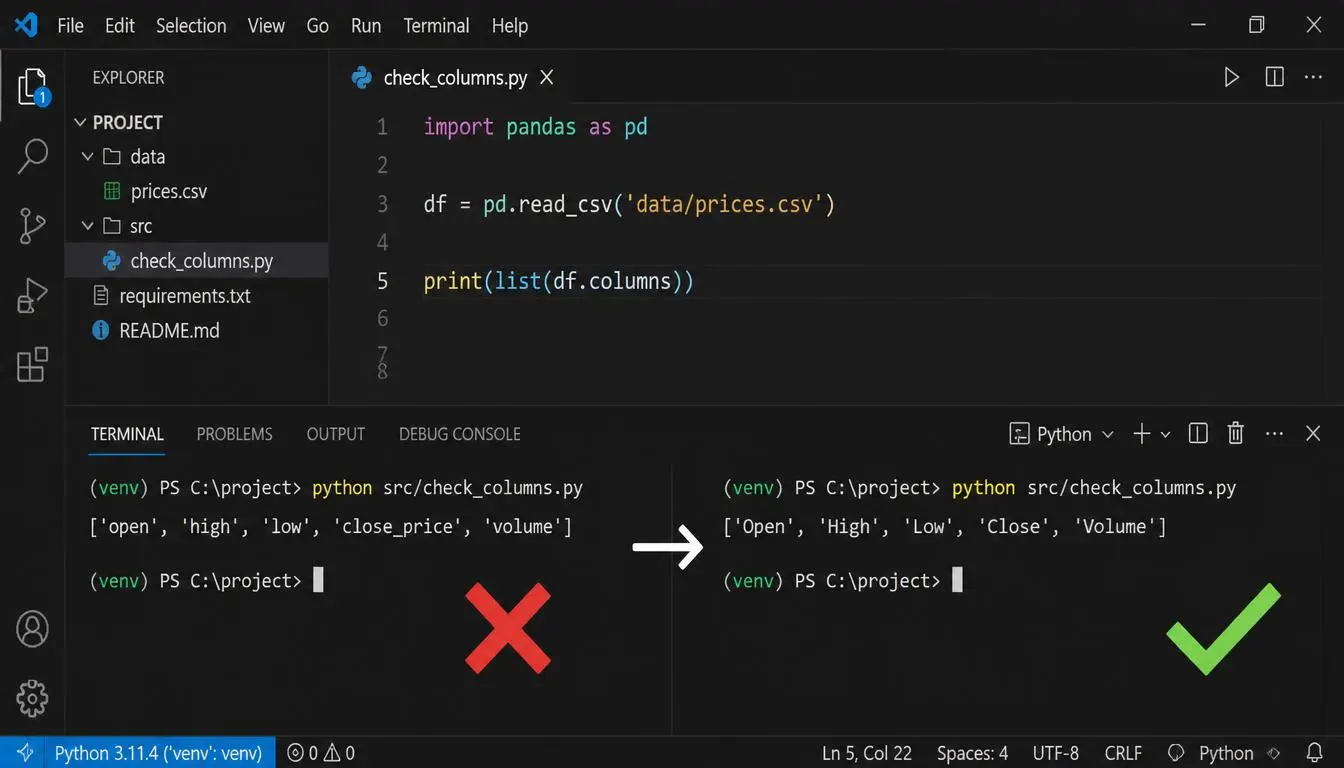
Backtesting.py looks for those exact strings when it initializes the Backtest object. It does something like data['Open'] internally. If your dataframe has 'open' instead, Python raises a KeyError. And if you're missing a column entirely, you'll get a message like ValueError: Some columns are missing from DataFrames: Open, High, Low, Close.
So how do you check before running a backtest? Easy:
# Quick sanity check before creating a Backtest
print(df.columns.tolist())
# Expected output: ['Open', 'High', 'Low', 'Close', 'Volume']
If you see lowercase or odd names, just rename them with pandas:
import pandas as pd

df = df.rename(columns={
    'open': 'Open',
    'high': 'High',
    'low': 'Low',
    'close': 'Close',
    'volume': 'Volume'
})

# Confirm the fix
print(df.columns.tolist())
If you're pulling data from a CSV export or an API like Alpha Vantage, you might encounter any of these variations:
| Source column name | Backtesting.py required | What happens? |
|---|---|---|
open | Open | KeyError |
Close Price | Close | KeyError |
O, H, L, C | Open, High, Low, Close | Missing column error |
Vol | Volume | Ignored or error depending on strategy |
Columns aren't the only thing you need to get right. A sorted and appropriately indexed DataFrame is recommended. The columns should also be numeric. If you load data from a CSV and forget to parse dates, you might end up with object columns, which is a pain. The good news is fixing this is straightforward once you know what to look for.
# Ensure index is datetime and sorted
df.index = pd.to_datetime(df.index)
df.sort_index(inplace=True)

# Drop rows with missing OHLC values
df = df.dropna(subset=["Open", "High", "Low", "Close"])

# Coerce to numeric if needed
df = df.apply(pd.to_numeric, errors="coerce")
df = df.dropna(subset=["Open", "High", "Low", "Close"])
If you download data with yfinance, you might get back a MultiIndex on the columns. That means df.columns looks like [('Open', 'AAPL'), ('High', 'AAPL'), ...]. Backtesting.py expects a flat index, so you need to flatten it before passing it in:
import yfinance as yf
import pandas as pd

df = yf.download('AAPL', start='2020-01-01', end='2021-01-01')

# Flatten MultiIndex columns if present
if isinstance(df.columns, pd.MultiIndex):
    df.columns = df.columns.get_level_values(0)

df = df[['Open', 'High', 'Low', 'Close', 'Volume']]
df = df.dropna(subset=["Open", "High", "Low", "Close"])
Now you're ready to run your backtest. If you want to see this working end-to-end with an actual strategy, our step-by-step Python backtesting tutorial walks you through the entire pipeline, from raw yfinance data to a plotted backtest. And if you're curious about the broader data preparation and strategy development process, the complete Python backtesting guide covers cleaning, indicator engineering, and performance pitfalls in more detail.
Backtesting.py expects specific column names: Open, High, Low, Close, and optionally Volume. Make sure your DataFrame uses these names exactly before running a backtest to avoid common data-related errors.
So, next time you're debugging a backtest that won't start, don't blame your strategy right away. Check your dataframe. Check the column names. Check the index. In many cases, it's just a formatting problem — and now you know exactly how to solve it.
Yes, completely case sensitive. And I mean brutally case sensitive. Backtesting.py looks for the exact strings 'Open', 'High', 'Low', 'Close', and 'Volume'. If your DataFrame has 'open' or 'OPEN', it doesn't match. Same for 'VOL' or 'volume'.
You might think you're being clever by using lowercase or a different abbreviation. But the library doesn't care. It will throw an error like:
KeyError: "Column 'Open' does not exist"Wait, that error message doesn't even list the actual column name? Right, that's part of the frustration. You check your DataFrame, you see a column called open, and you wonder why Backtesting.py can't find it. This is one of the quickest ways to get stuck on a simple backtest.
The fix is trivial, though. Use pandas rename() to standardise the names before feeding your data to the backtester:
import pandas as pd

df = df.rename(columns={
    'open': 'Open',
    'high': 'High',
    'low': 'Low',
    'close': 'Close',
    'volume': 'Volume'
})

# Verify your column names
print(df.columns.tolist())
That print() line is worth its weight in gold. It saves you from the silent disaster of thinking your columns are right when they're not.
| Backtesting.py expects | What you might have | Result |
|---|---|---|
Open | open | ❌ Error |
High | HIGH | ❌ Error |
Low | low | ❌ Error |
Close | Close Price | ❌ Error |
Volume | Vol | Optional, but if present it must match |
Here's another trap: extra whitespace. A column named ' Open ' — with spaces on either side — will also fail. It's easy to overlook when you're importing data from an Excel file or a CSV with messy headers. So after renaming, it's worth stripping any whitespace from column names too:
df.columns = df.columns.str.strip()
That one-liner has saved me more times than I care to admit. Combine it with the rename step and you'll have a clean DataFrame that Backtesting.py accepts without complaint.
If you're new to preparing data for backtesting, you might be interested in the broader steps in our Python Backtesting: The Complete Guide. And if you want to see the exact yfinance workflow from pandas DataFrame to a running backtest, the Backtesting.py tutorial walks through it all.
df.columns.tolist() immediately after loading your data. Look at the actual strings — not what you think they are. This single habit will eliminate most of the "column not found" errors people hit with Backtesting.py.So, to sum it up: yes, Backtesting.py is strict about capitalization. But the fix is simple. Rename, strip whitespace, verify, and move on. The earlier you internalise this, the less time you'll burn debugging something that should take seconds.
Preparing your DataFrame isn't the glamorous part of backtesting, but honestly, it's where most bugs are born. Maybe you've already tried to run a backtest and hit something like KeyError: 'Open' or ValueError: DatetimeIndex expected. That's normal. Let's walk through a simple, repeatable routine that takes about two minutes and saves you a whole lot of debugging.
A DatetimeIndex is usually the best choice for market data. If your data has a column called Timestamp or Date, set it as the index and convert it in one go:
df['Date'] = pd.to_datetime(df['Date'])
df.set_index('Date', inplace=True)
If the index already exists but the values are strings, convert it directly:
df.index = pd.to_datetime(df.index)
Here's a subtle one. Your index should be sorted in ascending order. Trading data out of order? It happens more than you'd think, especially if you're stitching together multiple CSV files. Fix it with a single line:
df.sort_index(inplace=True)Backtesting.py is picky about column names. It wants exactly Open, High, Low, Close, and optionally Volume. Not open. Not OPEN. Not Adj Close.
You can check what you're working with in one line:
print(df.columns.tolist())If your columns are close but not exact, use .rename(). This is the safer route because you're mapping names explicitly:
df = df.rename(columns={
    'open': 'Open',
    'high': 'High',
    'low': 'Low',
    'close': 'Close',
    'volume': 'Volume'
})
You might be tempted to do the shortcut I see everywhere:
df.columns = ['Open', 'High', 'Low', 'Close', 'Volume']
That works — but only if the column order is exactly correct. If your CSV has extra columns like Adj Close before volume, you just introduced a subtle bug that might not crash immediately but will quietly ruin your results. If you're not sure about the order, rename individually. Trust me, being explicit is worth it.
Run df.columns.tolist() again. You should see exactly ['Open', 'High', 'Low', 'Close', 'Volume'] or at least the first four of those.
Backtesting.py does not accept missing OHLC values, so you need to remove or appropriately fill incomplete rows before running the backtest:
df = df.dropna(subset=["Open", "High", "Low", "Close"])
# If your strategy also needs Volume:
# df = df.dropna(subset=["Open", "High", "Low", "Close", "Volume"])
This is better than a blanket df.dropna() because it avoids dropping rows with valid OHLC data just because an additional column (like sentiment) happens to be NaN.
Duplicate datetime indexes can sneak in when you download data across multiple time periods and combine them. To detect duplicates:
if df.index.duplicated().any():
    print('Duplicates found! Fixing...')
    df = df[~df.index.duplicated()]
Before passing anything to Backtest(), run a final sanity check:
df.info()
df.head()
Look for the right columns, no missing values in OHLC, and a suitably ordered index. That's it — no need to overthink this.
| Task | Code | Why It Matters |
|---|---|---|
| Convert index | df.index = pd.to_datetime(df.index) | Makes time-based slicing easier |
| Sort index | df.sort_index(inplace=True) | Prevents wrong order during strategy simulation |
| Rename columns | df.rename(columns=...) | Correct capitalization is mandatory |
| Drop missing OHLC values | df.dropna(subset=["Open","High","Low","Close"]) | Avoids errors and silent bugs from incomplete bars |
| Remove duplicates | df[~df.index.duplicated()] | Ensures unique timestamps |
Every time I pull data from a new source, I write those six checks before I even look at a chart. It might feel like extra work, but it absolutely prevents the classic "my strategy looks great but it's actually just a data bug" moment.
Once your DataFrame is clean, you're ready to feed it into Backtest(). If you want to see this exact preparation in action with a real Yahoo Finance download, check out How to Backtest a Trading Strategy in Python with backtesting.py or the broader Python Backtesting: The Complete Guide (2026) for context on where this fits in the bigger picture.
Take it from someone who has debugged too many ruined backtests: a few lines of cleaning now will save you hours of scratching your head later. Your future self will thank you.
So you've got price data sitting in a DataFrame, but the columns look anything but tidy. Maybe they're lowercase. Maybe they came from a CSV with names like open_price, high_price, close_price, and vol. Or perhaps you downloaded crypto data with columns named o, h, l, c, v.
Here's the thing: backtesting.py is strict. Not mean-strict, just precise-strict. It needs to see the exact capitalized strings Open, High, Low, Close, and Volume. No shortcuts. No aliases. Nope, not even OPEN with all caps.
The exact rename pattern is refreshingly simple. Start with whichever names you have and map them to the right ones:
df = df.rename(columns={
    'open': 'Open',
    'high': 'High',
    'low': 'Low',
    'close': 'Close',
    'volume': 'Volume'
})
Wait, is that it? Yes. That's the whole core of it. But let me show you a couple of real-world variations, because the columns you have are rarely all lowercase.
Here are some real-world examples of how different data sources name their columns and what you need to map them to:
df = df.rename(columns={
    'date': 'Date',
    'o': 'Open',
    'h': 'High',
    'l': 'Low',
    'c': 'Close',
    'v': 'Volume'
})
If your data uses Date or datetime as the date column, you might leave it alone — just make sure it becomes the DataFrame index later. But the OHLCV columns absolutely must match the expected names.
openOpen'open': 'Open'o, h, l, c, vOpen, High, Low, Close, Volume'o':'Open', 'h':'High', ...| Common source | Typical column names | Rename action |
|---|---|---|
| Yahoo Finance (yfinance) | Open, High, Low, Close, Volume | Usually no rename needed, just flatten MultiIndex |
| Alpha Vantage | 1. open, 2. high, 3. low, 4. close, 5. volume | Strip numbers and dots, then map |
| Binance API | open_time, open, high, low, close, volume | Rename open/high/low/close/volume, handle timestamp |
| CSV exports | OpenPrice, HighPrice, LowPrice, ClosePrice, Vol | Map each to the canonical short names |
Backtesting.py doesn't mind extra columns sitting in your DataFrame. In fact, the official documentation says the DataFrame can contain additional columns that your strategy can use. That's why a lot of people follow the rename with a safety cut:
df = df[['Open', 'High', 'Low', 'Close', 'Volume']]
That keeps only the columns backtesting.py cares about, which usually feels more peaceful anyway. Warning: only do this after you've converted your date column into the index. Otherwise you'll slice it right out of the DataFrame.
After renaming, run this tiny print statement:
print(df.columns.tolist())If you see ['Open', 'High', 'Low', 'Close', 'Volume'] you're good to go. If you see anything else, squint and fix the typo before moving on. I cannot tell you how many backtesting.py errors I've debugged that just came down to a lowercase v or an extra underscore lurking in the column list.
Ready to actually run the backtest? If you're loading from Yahoo Finance, the rename step often pairs with a MultiIndex flatten — exactly what I cover in How to Backtest a Trading Strategy in Python with backtesting.py. And if you want the full-fledged workflow from CSV to results, the Python Backtesting: The Complete Guide walks through the data prep step by step. But honestly, once you've got the columns right and verified them, the hardest part is behind you. Backtesting.py will take it from there.
df.columns.tolist() and eyeball it. That one line saves more hours than any fancy validator I know.Yahoo Finance is a convenient source of historical market data for Python backtesting. The yfinance library can download OHLCV data directly into a pandas DataFrame, but the downloaded data may need some preparation before it is passed to Backtesting.py.
The yfinance library provides a simple way to download historical price data:
import yfinance as yf

df = yf.download('AAPL', start='2020-01-01', end='2023-12-31')
Depending on the yfinance options and version you are using, the returned DataFrame may contain a MultiIndex for its columns. Instead of assuming a particular column structure, check for a MultiIndex and flatten it when necessary:
if isinstance(df.columns, pd.MultiIndex):
    df.columns = df.columns.get_level_values(0)
After this step, the price columns can be accessed using their standard names, such as Open, High, Low, Close, and Volume.
Backtesting.py works with a pandas DataFrame containing the standard OHLC price columns: Open, High, Low, and Close. Volume is optional and can be retained when your strategy or indicators use volume data.
| Example yfinance column | Column used by Backtesting.py |
|---|---|
('Open', 'AAPL') | Open |
('High', 'AAPL') | High |
('Low', 'AAPL') | Low |
('Close', 'AAPL') | Close |
('Volume', 'AAPL') | Volume |
Additional columns may also be present in the DataFrame. If they are not needed by your strategy, you can select only the columns required for your backtest:
df = df[['Open', 'High', 'Low', 'Close', 'Volume']]
It is also a good practice to check for missing values before running the backtest. Backtesting.py does not accept missing OHLC values, so remove or appropriately fill incomplete rows:
df = df.dropna(subset=["Open", "High", "Low", "Close"])
Heads-up: Make sure your DataFrame uses a suitable time-based index and that the rows are in chronological order. If necessary, convert the index with df.index = pd.to_datetime(df.index) and sort it with df = df.sort_index().
Once the DataFrame has been checked and prepared, select the columns needed by your backtest:
df = df[['Open', 'High', 'Low', 'Close', 'Volume']]
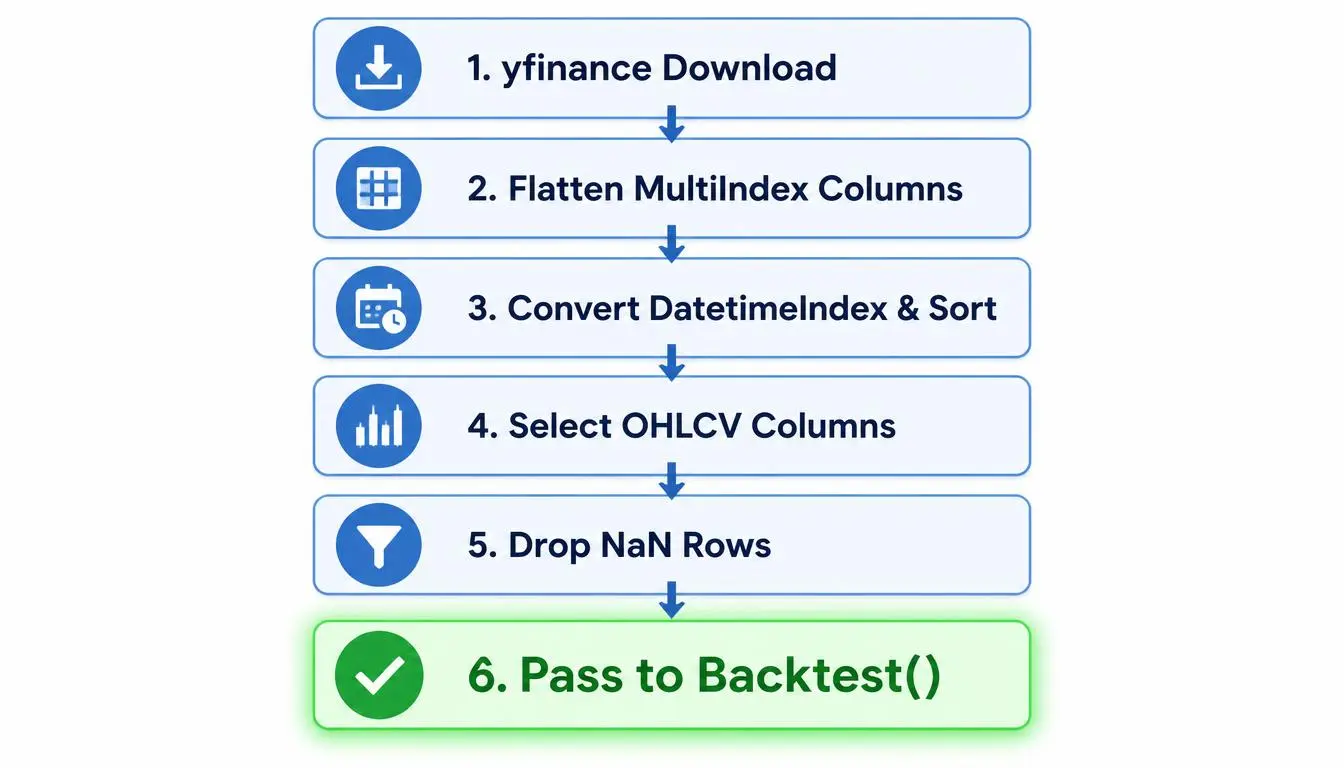
The complete preparation workflow can look like this:
import yfinance as yf
import pandas as pd
from backtesting import Backtest

df = yf.download('AAPL', start='2020-01-01', end='2023-12-31')

# Flatten MultiIndex columns when necessary
if isinstance(df.columns, pd.MultiIndex):
    df.columns = df.columns.get_level_values(0)

# Keep the columns needed by the backtest
df = df[['Open', 'High', 'Low', 'Close', 'Volume']]

# Clean and prepare the data
df = df.dropna(subset=["Open", "High", "Low", "Close"])
df.index = pd.to_datetime(df.index)
df = df.sort_index()

# Now run your Backtest
bt = Backtest(df, YourStrategy)
results = bt.run()
df[('Open','AAPL')] refer to the hierarchical column structure rather than the standard Open column. Flattening the MultiIndex when necessary makes the DataFrame easier to work with and aligns the column names with the format expected by Backtesting.py.If you're pulling data from a CSV instead, the same basic preparation principles apply: check the column names, data types, missing values, and chronological order before running the backtest. For a fuller walkthrough of building strategies with Backtesting.py, see our practical Backtesting.py tutorial or the broader complete Python backtesting guide.
Preparing the DataFrame before running a backtest helps prevent common data-format problems and makes the results easier to interpret. A few simple validation steps can save considerable debugging time later.
You've written your strategy, cleaned your data, and hit run. Then boom — a wall of red text. If you've spent any time on trading forums or Stack Overflow, you've probably seen the same desperate questions: "Why won't Backtesting.py find my Open column?" or "What does 'DatetimeIndex is not unique' even mean?"
Here's the thing: Backtesting.py is picky. Not in a malicious way — more like a meticulous librarian who needs everything in exactly the right spot before handing you a book. The good news? Nearly every data error boils down to one of a handful of issues, and all of them are quick fixes once you know the diagnosis.
This is the most common error, hands down. The library looks for exact strings: Open, High, Low, Close. If your DataFrame doesn't have one of those, you get a KeyError and your backtest dies instantly. Sometimes you accidentally filtered a column out during cleaning. Other times your data source named things differently — OPEN, price_open, Open Price, whatever. The fix is a simple rename:
df = df.rename(columns={
    'open': 'Open',
    'high': 'High',
    'low': 'Low',
    'close': 'Close',
    'vol': 'Volume'
})
After renaming, always verify with print(df.columns.tolist()). You'd be surprised how many "mysterious" errors vanish once you actually see what your columns are called.
Yes, column names are case sensitive. Open and open are completely different strings to the library. If your data source uses lowercase headers, you'll get the exact same missing-column error as above. The rename trick handles this too. Just remember: Backtesting.py expects title case — Open, High, Low, Close, and optionally Volume. No exceptions, no abbreviations.
Another classic. A sorted and appropriately indexed DataFrame is recommended for time-series backtesting. If your index is a RangeIndex or a bunch of strings, you may still be able to run a backtest, but the results are harder to interpret. For time-series data, a DatetimeIndex is usually the best choice because it preserves the actual timing of each bar. If you have duplicate dates from a bad merge or timezone mishap, you may see unexpected results — which honestly sounds terrifying until you realize it just means you've got repeats. Trust me, you don't want the confusing route. It wastes hours.
# Convert index to datetime
df.index = pd.to_datetime(df.index)

# Remove duplicates, keep the first occurrence
df = df[~df.index.duplicated(keep='first')]

# Sort ascending — recommended for chronological order
df = df.sort_index()

# Confirm it worked
print(type(df.index))  # <class 'pandas.core.indexes.datetimes.DatetimeIndex'>
Missing data is sneaky. Sometimes the backtest runs fine but gives you wildly unrealistic results. Other times it crashes with a confusing error deep inside the library — and you blame your strategy when it was really just a few empty cells. yfinance especially loves returning NaN for non-trading days or halted stocks. Backtesting.py does not accept missing OHLC values, so a targeted drop is usually best:
df = df.dropna(subset=["Open", "High", "Low", "Close"])
# If your strategy also needs Volume:
# df = df.dropna(subset=["Open", "High", "Low", "Close", "Volume"])
Want to see the damage before dropping? Run print(df.isna().sum()). That shows you exactly how many missing values live in each column. If you're losing lots of rows, you might want to investigate why rather than blindly deleting data. A halted stock for three weeks shouldn't be silently averaged into your backtest.
This one has become increasingly common. When you download data with yf.download('AAPL', ...), the resulting DataFrame can have a MultiIndex on columns — tuples like ('Open', 'AAPL'). The column isn't literally named Open anymore; it's a tuple. Backtesting.py throws its hands up and says "I can't find Open!" because, well, it's looking for a string and finding a tuple. The fix is to flatten the columns only when a MultiIndex is present:
df = yf.download('AAPL', start='2024-01-01', end='2025-01-01')

if isinstance(df.columns, pd.MultiIndex):
    df.columns = df.columns.get_level_values(0)
That strips the ticker level and leaves clean Open, High, Low, Close, Volume columns. If you want a fully walked-through example of this exact workflow, check out our step-by-step backtesting tutorial.
| Problem | Cause | Fix |
|---|---|---|
| Open missing | Wrong or missing column | Rename to Open |
| High missing | Wrong or missing column | Rename to High |
| Low missing | Wrong or missing column | Rename to Low |
| Close missing | Wrong or missing column | Rename to Close |
| lowercase columns | Case mismatch | Rename columns |
| NaN OHLC | Incomplete bars | df.dropna(subset=["Open","High","Low","Close"]) |
| MultiIndex | yfinance output | Flatten when isinstance(df.columns, pd.MultiIndex) |
| Wrong index | Unparsed dates | df.index = pd.to_datetime(df.index) |
print(df.head()) and print(df.columns) reveal most data issues in about five seconds. The error message gives you a clue, but the DataFrame tells you the truth.Backtesting.py only strictly requires Open, High, Low, and Close. Volume can be optional depending on your strategy. But if you do include it, it must be named Volume — again, case sensitive. And if your strategy references self.data.Volume, make sure the column survives your cleaning pipeline. It's heartbreaking to lose Volume during a dropna() because an empty row was in the middle of your dataset.
The bigger lesson here? Data errors are actually your friend. They surface the exact line that broke, and they force you to look at your DataFrame with fresh eyes. Once you've hit each of these once, you'll never trip over them again. And if you want to step back and see data prep from the full 30,000-foot view — including collection, cleaning, and why all this matters — our complete Python backtesting guide covers it end to end.
When in doubt: print, rename, handle NaNs, sort. You'll be back to testing strategies in no time.
You've got the theory down, but theory doesn't fill your brokerage account. Let's put it all together with a real example. Suppose you want to backtest a simple moving average crossover strategy on Apple data. Here's the full code — no fluff, just the stuff that works:
import pandas as pd
import yfinance as yf
from backtesting import Backtest, Strategy

# 1. Load data
df = yf.download("AAPL", start="2020-01-01", end="2022-01-01")

# 2. Flatten MultiIndex columns if present
if isinstance(df.columns, pd.MultiIndex):
    df.columns = df.columns.get_level_values(0)

# 3. Prepare the DataFrame
df.index = pd.to_datetime(df.index)
df = df.sort_index()
df = df[["Open", "High", "Low", "Close", "Volume"]]
df = df.dropna(subset=["Open", "High", "Low", "Close"])

# 4. Define a simple strategy
class MyStrategy(Strategy):
    def init(self):
        pass

    def next(self):
        pass

# 5. Run the backtest
bt = Backtest(df, MyStrategy, cash=10_000, commission=.001)
results = bt.run()
print(results)
The strategy itself is outside the scope of this article; the important part here is the DataFrame passed to Backtest(). Notice how the cleaning steps are ordered: flatten the columns, convert and sort the index, select the OHLCV columns, then drop rows with missing OHLC values. Do it in the wrong order, and you're hunting for bugs in your data pipeline instead of testing strategies.
Yahoo Finance via yfinance is the easiest starting point. Just specify a ticker and date range and you're most of the way there.
Flatten the columns when needed, fix the index, select exactly Open, High, Low, Close, Volume, and handle missing OHLC values.
Run the backtest, inspect results, then tweak your params. Rinse and repeat. That's the whole game.
This is basically the template you can use for any symbol and any strategy. Swap 'AAPL' for 'TSLA' or 'BTC-USD', adjust the strategy logic, change the commission — the data prep stays the same. Want to go deeper on the strategy side? Check out our hands-on tutorial with backtesting.py or the broader complete Python backtesting guide for more context on pipelines and gotchas.
One last thing. When bt.plot() opens, don't just look at the equity curve. Scroll through the trade markers. Ask yourself: did the strategy buy near lows consistently? Did it ride winners or cut winners too early? The plot tells a story that print(results) never will. Now go run it — and break things, because that's how you'll actually learn this library.
Before you run a single backtest, walk through this checklist. It takes less than a minute and prevents the most common data-related failures.
Open, High, Low, Close, and optionally VolumeDatetimeIndex is recommended, sorted in ascending orderprint(df.columns.tolist()) and print(df.head())By now, you've seen exactly how picky backtesting.py is about column names, data types, and indexes. If your goal is simply to learn the DataFrame structure, Backtesting.py is more than enough. But if you'd rather not fetch, clean, and standardize data from yfinance every time, Algotradium can simplify that part of the workflow.
Algotradium handles data ingestion and preparation behind the scenes, so you can focus on strategy logic. It's a practical option when you want to move from a tested idea to a live bot with fewer moving parts.
If you're comparing tools before settling on one, our Best Python Backtesting Libraries guide puts everything side by side. Many traders use both Backtesting.py and Algotradium.
At the end of the day, the best tool is the one that helps you test more ideas without burning time on data chores. Algotradium makes that easier.
Yeah, I know this part of backtesting isn't as glamorous as writing strategies. But honestly, almost every "it doesn't work" message in Backtesting.py starts with a data issue. So here are the questions I see most often, with the fixes that actually work.
Backtesting.py wants a pandas DataFrame with at least four columns named exactly Open, High, Low, and Close. Volume is optional but common. A DatetimeIndex is recommended for time-series data, although Backtesting.py can also work with a monotonic RangeIndex. Columns should hold numeric values — floats or ints — with no missing NaN entries in OHLC.
Why so strict? Because the engine slices rows by time and assumes clean OHLC data when it calculates equity, drawdowns, and orders. If you give it messy data, the numbers you get back are meaningless.
import pandas as pd
from backtesting import Backtest

df = pd.read_csv('AAPL.csv', parse_dates=['Date'], index_col='Date')
print(df.columns)  # ['Open','High','Low','Close','Volume']
print(df.index)    # DatetimeIndex, sorted ascending
print(df.isna().sum()) # check for missing values
The answer is simple: Open, High, Low, Close, and optionally Volume. The column names are case sensitive, so lowercase open won't work.
| Column | Required? | What it means |
|---|---|---|
Open | Yes | Price at the start of the period |
High | Yes | Highest traded price during the period |
Low | Yes | Lowest traded price during the period |
Close | Yes | Price at the end of the period |
Volume | Optional | Number of shares or contracts traded |
You can keep additional columns such as Adj Close or Symbol in your DataFrame. The official documentation says the DataFrame can have extra columns that your strategy uses. However, Backtesting.py expects the required columns to use their expected names. If a required column is missing or incorrectly named, the backtest may raise a KeyError.
Yes. Absolutely. 'open' is not the same as 'Open'. The library checks the exact string. If you downloaded data from somewhere that gives you lowercase or uppercase column names, you'll get an error.
This catches typos before they silently mess up your backtest. And the fix is one line:
df = df.rename(columns={
    'open': 'Open',
    'high': 'High',
    'low': 'Low',
    'close': 'Close',
    'volume': 'Volume'
})
print(df.columns.tolist())DatetimeIndex with pd.to_datetime() if needed.df.sort_index() if it isn't already ascending.df.dropna(subset=["Open","High","Low","Close"]).For the full picture of how this fits into a real workflow, the Python Backtesting: The Complete Guide walks through data collection, cleaning, and building a first backtest.
Use pandas' rename method:
df = df.rename(columns={
    'open': 'Open',
    'high': 'High',
    'low': 'Low',
    'close': 'Close',
    'volume': 'Volume'
})
Before running the backtest, verify your column names with print(df.columns.tolist()). This can help identify common issues such as spelling mistakes, unexpected capitalization, or trailing spaces in column names.
This one is super common because yfinance is the go-to free data source. The tricky part is that yfinance may return a MultiIndex for the columns when you download multiple tickers. Check for a MultiIndex and flatten it when necessary:
import yfinance as yf
import pandas as pd

df = yf.download('AAPL', start='2020-01-01', end='2023-12-31')

if isinstance(df.columns, pd.MultiIndex):
    df.columns = df.columns.get_level_values(0)

df.index = pd.to_datetime(df.index)
df = df[['Open','High','Low','Close','Volume']]
df = df.dropna(subset=["Open", "High", "Low", "Close"])
After that, you can pass df straight into Backtest(). If you want to see the whole flow with a simple moving-average strategy, check out this Python backtesting tutorial — it walks through the same steps with real code.
Here are the usual suspects and how to fix them quickly:
| Error or symptom | Likely cause | Quick fix |
|---|---|---|
KeyError: 'Open' | Column missing or wrong capitalization | Rename columns to exact Open etc. |
| "Data must be sorted ascending" | Index has out-of-order dates | df.sort_index() |
| TypeError about index | Index is strings or integers | df.index = pd.to_datetime(df.index) |
| NaN values in OHLC | Holidays, halts, or bad data feeds | df.dropna(subset=["Open","High","Low","Close"]) |
| Weird column names | MultiIndex not flattened | if isinstance(df.columns, pd.MultiIndex): df.columns = df.columns.get_level_values(0) |
A quick sanity check before every backtest:
assert list(df.columns[:4]) == ['Open', 'High', 'Low', 'Close']
df = df.dropna(subset=["Open", "High", "Low", "Close"])
Drop them in the comments — or better yet, play with the data and see what errors pop up. That's the fastest way to learn. And if this DataFrame dance feels tedious, you can always let a platform like Algotradium handle the plumbing for you while you focus on strategy logic.